学习目标
1. 理解MyBatis的设计思想
– MyBatis和JDBC的关系
– 为何将SQL语句都集中管理在XML映射文件中
2. 熟悉MyBatis的输入映射
– 未使用注解
– 使用注解
– ${}和#{}之间的区别
3. 熟悉MyBatis的输出映射
– 为什么resultType写的是单个结果的类型
– resultType和resultMap的联系和区别
4. 掌握动态SQL的使用
– 能够根据传入的值非空拼接SQL –> 条件插入、条件更新、条件查询
– foreach完成多条数据插入和in语句
– 获得自增的主键
5. 掌握一对一、一对多场景的封装(至少掌握一种)
6. 了解懒加载
7. 了解缓存
8. 了解注解
前置知识准备
– 常用的SQL语句的编写(CRUD等)
– JDBC对应的SQL完成预编译、提供参数、并且完成结果集的封装
– 懒加载和立即加载
MyBatis介绍
SSM: Spring、Spring MVC、MyBaits
MyBatis本是apache基金会的一个开源项目ibatis ,2010年这个项目有apache迁移到了google code, 并且改名为Mybatis。2013年11月代码迁移到了github. Mybatis是一个基于Java的持久层框架。
Mybatis是一个ORM(Object-Relationship-Mapping)框架。(对象关系映射)
– 类和表之间的关系(比如User类和cskaoyan_user表)
– 类中的成员变量和表中的列(名称、JavaType和JdbcType)
– 数据库中一条记录和Java中的一个实例(比如一个user对象和cskaoyan_user表中的一条记录)
MyBatis 是一款优秀的持久层框架,它支持自定义 SQL、存储过程以及高级映射。MyBatis 免除了几乎所有的 JDBC 代码以及设置参数和获取结果集的工作。MyBatis 可以通过简单的 XML 或注解来配置和映射原始类型、接口和 Java POJO(Plain Old Java Objects,普通老式 Java 对象)为数据库中的记录。
```
// ORM:Object Relationship Mapping。 对象关系映射(说白了, 就是可以把Java中的对象映射成关系)。 其实Mybatis就是一个可以帮助我们把 关系型数据库中的记录转化为 Java对象,把Java对象转化为关系型数据库中的记录的这么一个框架。
```
Mybatis就是一个可以帮助我们在Java代码中更加高效的去操作数据库的这么一个框架。
官网 : https://mybatis.org/mybatis-3/zh_CN/index.html | https://mybatis.net.cn/
入门案例(Quick start)
JDBC
```
//定义了UserDao接口,我们传入id,可以查询user的记录出来
public interface UserDao {
    User selectByPrimaryKey(Integer id) throws Exception;
}
// 假如我们定义了实现类,那么我们可以这样子来调用获得user记录
public class JdbcExecution {
    // 查询id为2的用户
    public static void main(String[] args) throws Exception{
        UserDao userDao = new UserDaoImpl();
        User user = userDao.selectByPrimaryKey(2);
        System.out.println("user = " + user);
    }
}
```
接着问题就是我们在实现类中的代码,使用JDBC的方式来完成,我们也把过程中的一些操作做一些分析,可以参考注释
```
public class UserDaoImpl implements UserDao{
    @Override
    public User selectByPrimaryKey(Integer id) throws Exception {
        // 1.获得连接,如果后面需要提交事务,则执行connection.commit
        Connection connection = JdbcUtil.getConnection();
        // 2.预编译,预编译过程中传入了SQL语句
        PreparedStatement preparedStatement = connection.prepareStatement("select id, username, password, age, birthday, create_date, mobile from cskaoyan_user where id = ?");
        // 3.提供占位符位置的值
        preparedStatement.setInt(1,id);
        // 4.执行查询获得结果集
        ResultSet resultSet = preparedStatement.executeQuery();
        // 5.创建一个接收结果集中的值的实例
        User user = new User();
        while (resultSet.next()) {
            // 6.获得结果集中的username列(column)中的值
            String username = resultSet.getString("username");
            //   获得结果集中的password列(column)中的值
            String password = resultSet.getString("password");
            int age = resultSet.getInt("age");
            Date birthday = resultSet.getDate("birthday");
            Date createDate = resultSet.getDate("create_date");
            String mobile = resultSet.getString("mobile");
            user.setId(id);
            // 7.通过set方法封装给user实例中的username这个成员变量(property)
            user.setUsername(username);
            //   通过set方法封装给user实例中的password这个成员变量(property)
            user.setPassword(password);
            user.setAge(age);
            user.setBirthday(birthday);
            user.setCreateDate(createDate);
            user.setMobile(mobile);
        }
        return user;
    }
}
```
这个过程比较繁琐,并且存在着很多定制化的内容和耦合
- SQL语句和代码直接耦合在一起
- 设置参数过程比较繁琐,对应的关系只有占位符的序号,如果有多个占位符?的话,容易出错
- 查询结果集的使用比较繁琐
- 手动调用构造方法来获得实例
- 要关注列名从结果集中取出数据
- 要关注列的类型手动调用不同的方法,比如getInt、getString、getDate
- 取出的值需要使用set方法来封装
MyBatis
导包
```
<!--mybatis-->
<dependency>
       <groupId>org.mybatis</groupId>
       <artifactId>mybatis</artifactId>
       <version>3.5.9</version>
</dependency>
<!-- 数据库驱动包 -->
<dependency>
    <groupId>mysql</groupId>
    <artifactId>mysql-connector-java</artifactId>
       <version>8.0.20</version>
   </dependency>
```
配置1: 配置一个Mybatis的主配置文件,用来获取SqlSessionFactory
```
// SqlSessionFactory:每一个Mybatis应用都是以SqlSessionFactory的实例对象为核心的。使用Mybatis必须以SqlSessionFactory的实例为核心,再以SqlSessionFactory的实例生产SqlSession实例对象的。
// SqlSession:这个其实表示和数据库之间的一个连接,里面封装了 Connection对象
```
```
<?xml version="1.0" encoding="UTF-8" ?>
<!DOCTYPE configuration
      PUBLIC "-//mybatis.org//DTD Config 3.0//EN"
      "https://mybatis.org/dtd/mybatis-3-config.dtd">
 <configuration>
      <environments default="development">
       <environment id="development">
         <transactionManager type="JDBC"/>
          <dataSource type="POOLED">
           <property name="driver" value="${driver}"/>
            <property name="url" value="${url}"/>
            <property name="username" value="${username}"/>
            <property name="password" value="${password}"/>
          </dataSource>
        </environment>
      </environments>
      <mappers>
        <mapper resource="org/mybatis/example/BlogMapper.xml"/>
      </mappers>
    </configuration>
```
配置2: 配置一个专门用来存放SQL语句的配置文件,Mapper.xml
```
// 在Mybatis中,这样的文件可以有多个
// 这些文件,都必须在Mybatis的主配置文件中,声明进来、
```
```
<?xml version="1.0" encoding="UTF-8" ?>
<!DOCTYPE mapper
       PUBLIC "-//mybatis.org//DTD Mapper 3.0//EN"
       "http://mybatis.org/dtd/mybatis-3-mapper.dtd">
<!-- namespace: 命名空间,整个项目中必须唯一,暂时可以任意取名(后面再进行标准化) -->
<mapper namespace="usersql">
   <!-- 每个标签都需要一个唯一的id属性:
 每一个标签的id不能重复(本Mapper文件中), 用来标识一条SQL  -->
       <!-- 在这个Mapper文件中, 怎么唯一表示SQL语句?
       namespace.id (命名空间.标签的id ) 是这个SQL语句的坐标  -->
   <!-- <insert> 插入标签 -->
       <!-- <delete> 删除标签 -->
        <!-- <update> 修改标签 -->
       <!-- <select> 查询标签 -->

       <!-- parameterType:参数的类型(可以省略,标准语法要指明 ) -->
       <!-- resultType:返回的结果集的类型(不能省略) -->
   <select id="selectByPrimaryKey" resultType="com.cskaoyan.model.User">
           select id, username, password, age, birthday, create_date as createDate, mobile from cskaoyan_user where id = #{id}
       </select>

    </mapper>
```
使用
```
//使用的代码和前面完全一样
public class MyBatisExecution {

   // 查询id为2的用户
   public static void main(String[] args) throws Exception{
       UserDao userDao = new UserDaoImpl();
       User user = userDao.selectByPrimaryKey(2);
       System.out.println("user = " + user);
   }
}
```
但是UserDaoImpl中的实现则完全不一样了
```
public class UserDaoImpl implements UserDao{
   @Override
   public User selectByPrimaryKey(Integer id) {
       // 1.获得全局共享的SqlSessionFactory(线程安全)
       SqlSessionFactory sqlSessionFactory = MyBatisUtil.getSqlSessionFactory();
       // 2.开启SqlSession(线程不安全),其中封装了Connection
       SqlSession sqlSession = sqlSessionFactory.openSession();
       // 3.(1)传入Sql的坐标;(2)传入参数;(3)查询结果集的封装
       User user = sqlSession.selectOne("usersql.selectByPrimaryKey", id);
       return user;
   }
}
```
其中MyBatisUtil是提供全局共享的SqlSessionFactory实例的
```
public class MyBatisUtil {
     // 线程安全的值,可以全局共享
     private static SqlSessionFactory sqlSessionFactory;
     static {
        try {
          sqlSessionFactory = new SqlSessionFactoryBuilder().build(Resources.getResourceAsStream("mybatis.xml"));
        } catch (IOException e) {
          e.printStackTrace();
        }
     }

     public static SqlSessionFactory getSqlSessionFactory() {
        return sqlSessionFactory;
     }
}
```
分析
在上面的案例中MyBatis默默的替我们做了什么事情
- connection.preparedStatement需要传入的Sql语句,我们仅仅提供了坐标(映射文件的命名空间+id)
- 参数和占位符的对应关系,自动对应起来
- resultSet获得结果集,并且封装为User实例的过程完全是MyBatis自动完成的
而上面的过程其实是实际开发过程中非常繁琐,而又很通用的事情
搭建开发环境(MyBatis)
Maven项目
第一步: 导包在pom.xml
```
<dependencies>
 <!--mybatis-->
 <dependency>
       <groupId>org.mybatis</groupId>
       <artifactId>mybatis</artifactId>
       <version>3.5.9</version>
 </dependency>

 <!-- 数据库驱动包 -->
 <dependency>
       <groupId>mysql</groupId>
       <artifactId>mysql-connector-java</artifactId>
       <version>8.0.20</version>
 </dependency>

<!-- 测试包 -->
 <dependency>
       <groupId>junit</groupId>
       <artifactId>junit</artifactId>
       <version>4.12</version>
 </dependency>
</dependencies>
```
第二步: 配置MyBatis的主配置文件(
mybatis-config.xml)
```
<?xml version="1.0" encoding="UTF-8" ?>
<!DOCTYPE configuration
PUBLIC "-//mybatis.org//DTD Config 3.0//EN"
"https://mybatis.org/dtd/mybatis-3-config.dtd">
<configuration>
<!-- 环境的配置,其实就是去配置数据库连接-->
<environments default="development">
<environment id="development">
<transactionManager type="JDBC"/>
<dataSource type="POOLED">
<property name="driver" value="com.mysql.jdbc.Driver"/>
<property name="url" value="jdbc:mysql://localhost:3306/clazz61?characterEncoding=utf8&serverTimezone=GMT%2B8"/>
<property name="username" value="root"/>
<property name="password" value="123456"/>
</dataSource>
</environment>
</environments>
<!-- 去查找的Mapper文件 -->
<mappers>
<mapper resource="com/snow/www/mapper/AccountMapper.xml"/>
</mappers>
</configuration>
```
第三步: 创建一个Java接口Mapper接口文件 (注意路径)
第四步: 创建一个与Java接口文件对应的Mapper.xml配置文件
```
// 在第三/四步骤中:
1, 注意路径保持, 最终经过编译和对应接口文件编译到同一包下 (映射文件在src\main\resources和接口在src\main\java中的包目录要一致)
2, 文件的名字和接口的文件的名字保持一致
3, xml中的namespace(命名空间)的值要和Java接口的全限定名称保持一致
```
第五步: 把mapper.xml配置文件引入到主配置文件中(
mybatis-config.xml)
```
<!-- 去查找的Mapper文件 -->
<mappers>
<mapper resource="com/snow/www/mapper/AccountMapper.xml"/>
</mappers>
```
第六步: 加载主配置文件(
mybatis-config.xml)
```
// 1. 读取配置文件
InputStream inputStream = null;
try {
inputStream = Resources.getResourceAsStream("mybatis-config.xml");
} catch (IOException e) {
e.printStackTrace();
}

// 2. 获取SqlSessionFactory
SqlSessionFactoryBuilder sqlSessionFactoryBuilder =
				new SqlSessionFactoryBuilder();
sqlSessionFactory = sqlSessionFactoryBuilder.build(inputStream);
```
第七步: 在对应的Mapper文件和对应的Java接口中, 声明SQL和声明方法
```
// 注意:
1, 方法名和对应xml的SQL的id保持一致
2, 参数和返回值设置正确
3, 注意SQL返回值类型parameterType(结果集的解析是Mybatis自动完成的,不用我们自己解析)
4, 注意SQL语句书写正确
```
```
// 添加
public int insertAccount(Account account);
// 查找
public Account selectAccountById(Integer id);
```
```
<insert id="insertAccount" >
insert into account set id=#{id}, name=#{name}, money=#{money}
</insert>
<select id="selectAccountById"  parameterType="java.lang.Integer" resultType="com.snow.www.bean.Account">
select * from account where id = #{id}
</select>
```
第八步: 获取SqlSession 和 代理的Mapper对象
```
// 1. 获取SqlSession
sqlSession = sqlSessionFactory.openSession(true);

// 2. 获取接口的代理对象
studentMapper = sqlSession.getMapper(AccountMapper.class);
```
第九步: 通过代理对象调用方法执行SQL语句
```
Account account = new Account();
account.setId(10);
account.setName("snow");
account.setMoney(200);
int rows  = accountMapper.insertAccount(account);
```
动态代理(Dynamic Proxy)
动态代理
一些问题
```
// 目前Mybatis使用起来还不够灵活,不够简单。
// 虽然解决了SQL语句硬编码的问题,但是又出现了新的问题
SQL语句的坐标存在硬编码
sqlSession调用的方法需要我们自己去指定
//也就是UserDaoImpl中的内容还不够通用,我们想要进一步干掉它
```
而Mybatis的动态代理可以帮助我们去生成接口的代理对象。我们可以自己不实现接口。
```
// 不需要实现接口,那么就需要遵守Mybatis使用动态代理的一些规则
1, 接口的全限定名称 和 mapper.xml中的namespace的值保持一致
2, 接口中的方法和 xml文件中的 <select> <insert> <update> <delete> 标签 一一对应,并且方法名要和标签的id值保持一致
3, 方法的返回值类型和标签中的resultType保持一致(注意:添加/删除/修改不需要返回值类型)
4, 参数保持一致(暂时可以不写)

// 建议要遵守的规则:希望
1, 文件的名字 UserMapper.xml  | UserMapper.java 建议保持一致
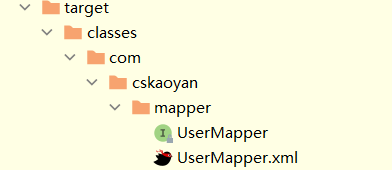
2, UserMapper.xml 和UserMapper.java 在编译之后的位置应该要在同一个路径下
```
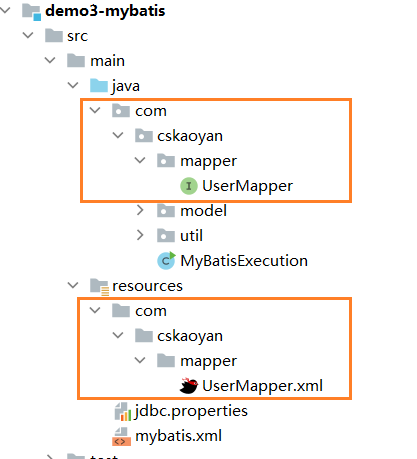
编译后在同一路径
如何使用动态代理呢?
```
public class MyBatisExecution {

    // 查询id为2的用户
    public static void main(String[] args) throws Exception{
        //UserDao userDao = new UserDaoImpl();
        // 1.获取SqlSession
        SqlSession sqlSession = MyBatisUtil.getSqlSessionFactory().openSession();
        // 2.根据SqlSession获得Mapper代理对象
        UserMapper userDao = sqlSession.getMapper(UserMapper.class);
        // 3.代理对象执行方法
        User user = userDao.selectByPrimaryKey(2);
        System.out.println("user = " + user);
    }
}
```
增删改查示例
添加
```
Account account = new Account();
account.setId(10);
account.setName("李白");
account.setMoney(200);
int rows  = accountMapper.insertAccount(account);

// sqlSession.commit();
Connection connection = sqlSession.getConnection();
connection.commit();
```
```
// 添加
public int insertAccount(Account account);
```
```
<!--public int insertAccount(Account account);-->
<insert id="insertAccount" >
       insert into account set id=#{id}, name=#{name}, money=#{money}
</insert>
```
删除
```
int rows  = accountMapper.deleteAccountById(10);
// sqlSession.commit();
Connection connection = sqlSession.getConnection();
connection.commit();
```
```
// 删除
public int deleteAccountById(Integer id);
```
```
<delete id="deleteAccountById">
       delete from account where id=#{id}
</delete>
```
修改
```
Account account = new Account();
account.setId(10);
account.setName("zs");
account.setMoney(2000);
int rows  = accountMapper.updateAccountById(account);

// sqlSession.commit();
Connection connection = sqlSession.getConnection();
connection.commit();
```
```
// 修改
public int updateAccountById(Account account);
```
```
<update id="updateAccountById">
       update account set name=#{name}, money=#{money} where id =#{id}
</update>
```
查找
```
Account account = accountMapper.selectAccountById(10);
System.out.println(account);
```
```
// 查找
public Account selectAccountById(Integer id);
```
```
<select id="selectAccountById"  parameterType="java.lang.Integer" resultType="com.snow.www.bean.Account">
   select * from account where id = #{id}
</select>
```
事务
在使用Mybatis的时候, 自带事务,而且事务默认情况下是不会自动提交的
```
// 解决办法一:  执行完SQL语句之后, 使用sqlSession提交事务
sqlSession.commit();
// 解决办法二:  执行完SQL语句之后, 使用sqlSession内部封装的Connection 提交事务
   Connection conn  = sqlSession.getConnection();
   conn.commit();
// 解决办法三:(自动提交) 在获得SqlSession的时候, 给sqlSessionFactory.openSession设置为真
   // 获取到的SqlSession,里面的connection不会自动提交
   SqlSession session = sqlSessionFactory.openSession();
   // 获取自动提交的SqlSession
   SqlSession session = sqlSessionFactory.openSession(true);
```
配置(MyBatis)
主要是介绍Mybatis的核心配置文件。
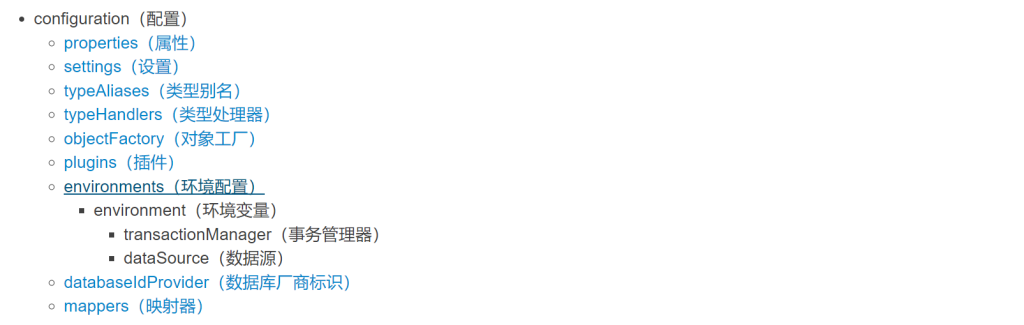
这些标签是有序的
properties
properties表示可以外部配置的属性,并可以进行动态替换。(作为典型的是JDBC配置)
```
driver=com.mysql.jdbc.Driver
url=jdbc:mysql://localhost:3306/db47?useSSL=false&userUnicode=true&characterEncoding=utf8
username=root
password=123456
```
```
<configuration>
   <!-- 引入外部配置文件 -->
   <properties resource="jdbc.properties" ></properties>
</configuration>
```
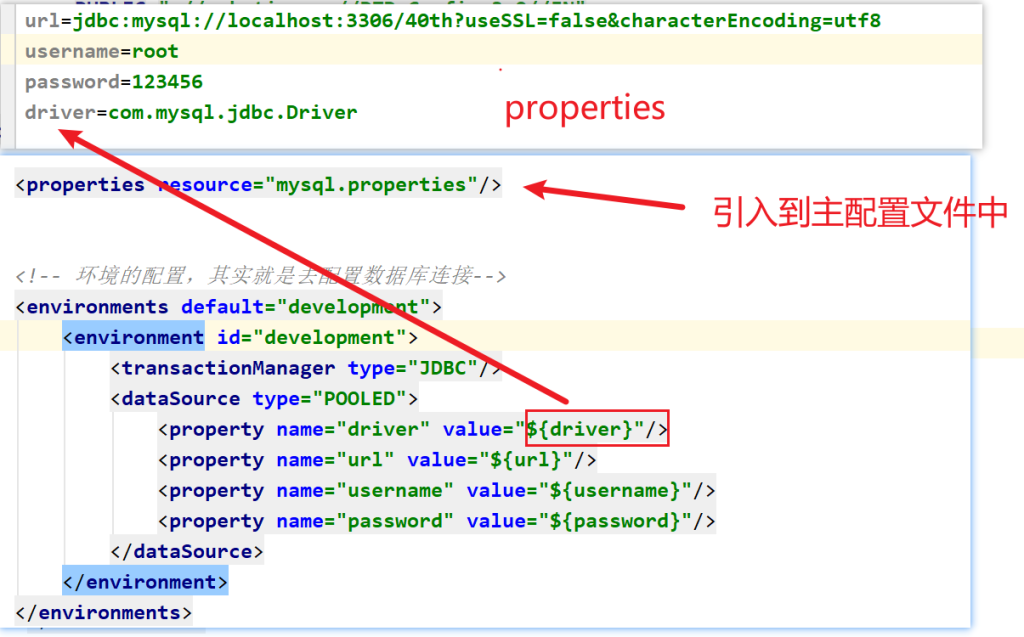
settings
settings是MyBatis的行为配置(类似于idea和settings的关系)
eg: 日志配置
```
<configuration>
   <settings>
       <!--  添加日志的配置 -->
       <setting name="logImpl" value="STDOUT_LOGGING"/>
</settings>
</configuration>
```
一个完整的settings配置 (暂时没用)
```
<settings>
 <setting name="cacheEnabled" value="true"/>
 <setting name="lazyLoadingEnabled" value="true"/>
 <setting name="aggressiveLazyLoading" value="true"/>
 <setting name="multipleResultSetsEnabled" value="true"/>
 <setting name="useColumnLabel" value="true"/>
 <setting name="useGeneratedKeys" value="false"/>
 <setting name="autoMappingBehavior" value="PARTIAL"/>
 <setting name="autoMappingUnknownColumnBehavior" value="WARNING"/>
 <setting name="defaultExecutorType" value="SIMPLE"/>
 <setting name="defaultStatementTimeout" value="25"/>
 <setting name="defaultFetchSize" value="100"/>
 <setting name="safeRowBoundsEnabled" value="false"/>
 <setting name="safeResultHandlerEnabled" value="true"/>
 <setting name="mapUnderscoreToCamelCase" value="false"/>
 <setting name="localCacheScope" value="SESSION"/>
 <setting name="jdbcTypeForNull" value="OTHER"/>
 <setting name="lazyLoadTriggerMethods" value="equals,clone,hashCode,toString"/>
 <setting name="defaultScriptingLanguage" value="org.apache.ibatis.scripting.xmltags.XMLLanguageDriver"/>
 <setting name="defaultEnumTypeHandler" value="org.apache.ibatis.type.EnumTypeHandler"/>
 <setting name="callSettersOnNulls" value="false"/>
 <setting name="returnInstanceForEmptyRow" value="false"/>
 <setting name="logPrefix" value="exampleLogPreFix_"/>
 <setting name="logImpl" value="SLF4J | LOG4J | LOG4J2 | JDK_LOGGING | COMMONS_LOGGING | STDOUT_LOGGING | NO_LOGGING"/>
 <setting name="proxyFactory" value="CGLIB | JAVASSIST"/>
 <setting name="vfsImpl" value="org.mybatis.example.YourselfVfsImpl"/>
 <setting name="useActualParamName" value="true"/>
 <setting name="configurationFactory" value="org.mybatis.example.ConfigurationFactory"/>
</settings>
```
typeAliases
typeAlies类型别名。(也就是我们可以对 类 起别名,简化操作) (暂时不建议使用)
```
<configuration>

 <!-- 类型别名 -->
 <typeAliases>
     <!-- alias别名 type全限定名 -->
     <typeAlias alias="account" type="com.snow.www.bean.Account"/>
     <typeAlias alias="user" type="com.snow.www.bean.User"/>
     <package name="com.snow.www.bean"/>
 </typeAliases>
</configuration>
```
```
<select id="selectAccountById"  resultType="account">
 select * from account where id = #{id}
</select>
```
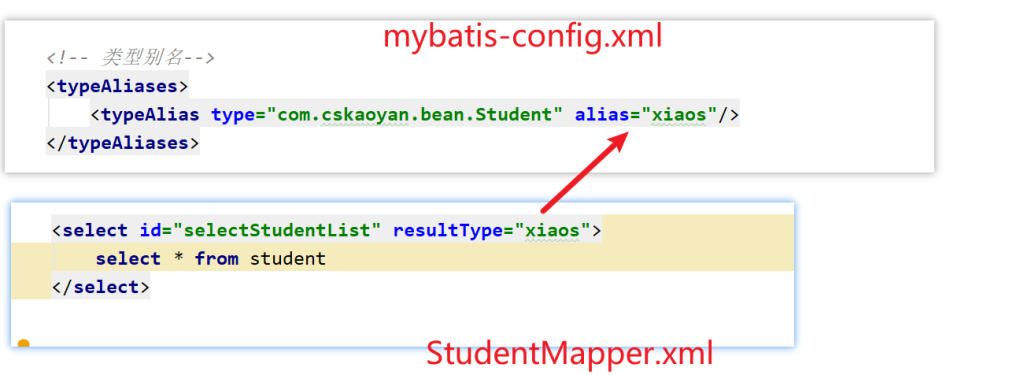
注意: Mybatis对于一些基本类型和包装类型,以及集合类型,有内置的别名。
```
// 值得注意的是下面是一些为常见的 Java 类型内建的类型别名。它们都是不区分大小写的,而且为了应对原始类型的命名重复,采取了特殊的命名风格。
// 注意: 除了内置别名,  不要乱起别名
```
```
 <select id="selectNameById"
            parameterType="java.lang.Integer"
            resultType="java.lang.String">
        select name from account where id = #{id}
</select>
<select id="selectNameById"
        parameterType="Integer"
        resultType="String">
    select name from account where id = #{id}
</select>
<select id="selectNameById"
        parameterType="integer"
        resultType="string">
    select name from account where id = #{id}
</select>
<select id="selectNameById"
            parameterType="_int"
            resultType="String">
     select name from account where id = #{id}
</select>
```
| 别名 | 映射的类型 |
| :——— | :——— |
| _byte | byte |
| _long | long |
| _short | short |
| _int | int |
| _integer | int |
| _double | double |
| _float | float |
| _boolean | boolean |
| string | String |
| byte | Byte |
| long | Long |
| short | Short |
| int | Integer |
| integer | Integer |
| double | Double |
| float | Float |
| boolean | Boolean |
| date | Date |
| decimal | BigDecimal |
| bigdecimal | BigDecimal |
| object | Object |
| map | Map |
| hashmap | HashMap |
| list | List |
| arraylist | ArrayList |
| collection | Collection |
| iterator | Iterator |
注意:
1, typeHandlers: MyBatis 对我们SQL参数或从结果集中取出一个值时, 都会用类型处理器将获取到的值以合适的方式转换成 Java 类型。(而在我们使用的时候是无法感知这个问题的, 属于MyBatis的底层处理).
2, ObjectFactory: MyBatis 使用一个对象工厂实例来完成实例化工作。 默认的对象工厂要么通过默认无参构造方法,要么通过有参数的构造方法实例化对象。如果想覆盖对象工厂的默认行为,可以通过创建自己的对象工厂来实现。(不要使用)
environments
environments: 可以配置成适应多种环境.比如开发环境、测试环境和生产环境等可能需要有不同的配置.
```
<!-- 环境的配置,其实就是去配置数据库连接-->
<environments default="development">

   <!-- 环境的id,是唯一的-->
   <environment id="development">

       <!-- 事务管理器
           JDBC:   使用JDBC连接来管理事务
           MANAGED: 把事务的管理交给外部的容器 -->
       <!-- 如果你正在使用 Spring + MyBatis,则没有必要配置事务管理器,
			因为 Spring 模块会使用自带的管理器来覆盖前面的配置。-->
       <transactionManager type="JDBC"/>

       <!--
           POOLED: 使用Mybatis自带的连接池
           UNPOOLED:不使用连接池
           JNDI:使用外部的连接池  -->
       <dataSource type="POOLED">
           <property name="driver" value="${driver}"/>
           <property name="url" value="${url}"/>
           <property name="username" value="${username}"/>
           <property name="password" value="${password}"/>
       </dataSource>
   </environment>

   <environment id="test">
       <transactionManager type="JDBC"/>
       <dataSource type="POOLED">
           <property name="driver" value="${driver}"/>
           <property name="url" value="${url}"/>
           <property name="username" value="${username}"/>
           <property name="password" value="${password}"/>
       </dataSource>
   </environment>

   <environment id="prod">
       <transactionManager type="JDBC"/>
       <dataSource type="POOLED">
           <property name="driver" value="${driver}"/>
           <property name="url" value="${url}"/>
           <property name="username" value="${username}"/>
           <property name="password" value="${password}"/>
       </dataSource>
   </environment>
</environments>
```
mappers
这个是映射器的配置。配置mapper.xml配置文件。
配置方式一: 直接以对应mapper文件的相对路径
```
<configuration>
 <mappers>
        <mapper resource="com/snow/www/mapper/AccountMapper.xml"/>
        <mapper resource="com/snow/www/mapper/User.xml"/>
    </mappers>
</configuration>
```
配置方式二: 配置某个包下的所有的配置文件
```
<configuration>
  <!--
        1. 接口和映射文件编译后要在同一级目录,并且同名
        2. 接口的全限定类名作为映射文件的命名空间
        3. 接口中的方法名(方法不允许重载)作为映射文件中的标签id(不允许重复)
    -->
	<mappers>
        <package name="com.snow.www.mapper"/>
    </mappers>
</configuration>
```
输入映射(!!!)
输入映射其实就是在说Mybatis是如何传值的。
映射文件中的SQL语句中的语法 –> #{}里写什么东西
#{}这个位置 最终在预编译的过程中变为了?
在Mapper接口中 方法的形参写了什么样式(个数、类型、注解),最终在映射文件中该方法对应的sql语句中的#{}应该如何写
```
// 只有一个参数
// 传递多个参数
// ....
```
一个参数
一个参数: (基本类型、包装类、String)
1, #{任意值} 来取值: 不建议使用(显得不标准), 建议使用注解写法
```
// 虽然一个参数的时候, 可以在{}内部任意书写参数名, 这种乱写行为不好, 不要这么写
```
```
// 查找
public Account selectAccountById(Integer id);
```
```
<select id="selectAccountById"  resultType="account">
     select * from account where id = #{xxx}
</select>
```
2, 如果在方法中 的一个参数 加了@Param注解,那么 后面就只能通过 #{注解值} 来取值
```
// 查找
public Account selectAccountById2(@Param("id") Integer id);
```
```
<select id="selectAccountById2"   resultType="acc">
     select * from account where id = #{id}
</select>
```
多个参数
多个参数: 需要注解指明#{注解值} 来取值
```
// 1, 直接写多个值, 用参数名简单匹配是不识别的
// 2, 如果参数名简单匹配是不识别, 又不想加注解, 也是有别的解决手段(按位传值: 不建议), 但是建议加注解(最标准的写法)
```
```
// 查找
List<Account> selectListByIdOrName(@Param("id") Integer id,
                             @Param("name") String name);
```
```
<select id="selectListByIdOrName"   resultType="acc">
select * from account where id = #{id} or name = #{name}
</select>
```
对象传值
对象传值
方式一: SQL使用的参数命名要和对象内部属性保持一致 (#{成员变量名} 来取值)
```
public interface UserMapper {
 //对象传值 → 没有使用@Param注解 → 成员变量名
 int insert1(User user);

}
```
```
<insert id="insert1">
 insert into cskaoyan_user (username, password, age, birthday, create_date, mobile) values
 (#{username},#{password},#{age},#{birthday},#{createDate},#{mobile})
</insert>
```
方式二: 对象有注解, 必须通过 #{注解值 . 成员变量名} 来取值
```
//对象传值 → 使用@Param注解 → @Param写了什么就用什么 → user.username、user.password等
int insert2(@Param("user") User user);
```
```
<insert id="insert2">
 insert into cskaoyan_user (username, password, age, birthday, create_date, mobile) values
 (#{user.username},#{user.password},#{user.age},#{user.birthday},#{user.createDate},#{user.mobile})
</insert>
```
注意: 对象和多参数混合问题
使用Map传值
Map传值: 不建议使用
方式一: SQL使用的参数命名要和Map中存储数据的key保持一致 (#{key} 来取值)
```
//Map传值 → 没有使用@Param注解 → #{}里写的是map的key:id和username
    int updateUsernameById(Map map);
```
```
<update id="updateUsernameById">
     update cskaoyan_user set username = #{username} where id = #{id}
</update>
```
方式二: Map对象有注解, 必须通过 #{注解值 . key} 来取值
```
//Map传值 → 使用@Param注解 → #{}里写的是@Param注解的值 + map的key:map.id和map.username
int updateUsernameById2(@Param("map") Map map);
```
```
<update id="updateUsernameById2">
     update cskaoyan_user set username = #{map.username} where id = #{map.id}
</update>
```
按位置取值
按位传值: 完全不建议(容易因为程序员的记忆和修改导致bug产生, 除非除了按位传值没办法了)
方式一: arg0、arg1、arg2…
```
userMapper.insertUser("zs", 18, "湖北");
```
```
<insert id="insertUser">
       insert into `user`  set `name`=#{arg0}, age=#{arg1}, address=#{arg2}
</insert>
```
方式二: param1、param2、param3…
```
userMapper.insertUser("zs", 18, "湖北");
```
```
<insert id="insertUser">
       insert into `user`  set `name`=#{param1}, age=#{param2}, address=#{param3}
</insert>
```
在Mybatis的输入映射中,我们经常使用前面三种方式(传入一个参数、传入多个参数、传递对象),后面通过map传值和按照位置来传值 一般不使用,也不建议大家使用。
#和$的区别
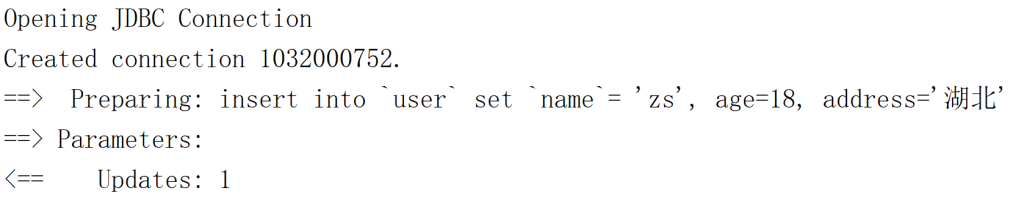
\${}做的就是字符串的拼接,如果你传入的是字符串,需要你手动在\${}外围手动增加单引号 ”
核心点: 使用${}有sql注入的风险
SQL注入:在你执行的SQL语句之外额外执行一部分,导致信息泄露或数据库被丢弃;
使用#{}过程是预编译,不会有SQL注入的风险,建议大家使用的方式
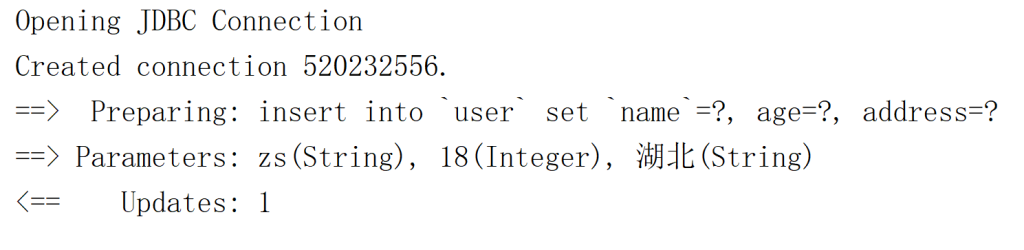
#{参数}使用: 预编译占位 (尽量使用 #{} ) PreparedStatement
```
userMapper.insertUserC("zs", 18, "湖北");
```
```
<insert id="insertUserC">
       insert into `user`  set `name`=#{param1}, age=#{param2}, address=#{param3}
</insert>
```
${参数}使用: 字符串拼接, Statement (存在SQL注入问题)
```
userMapper.insertUserP("zs", 18, "湖北");
```
```
<insert id="insertUserP">
insert into `user`  set `name`= '${param1}', age=${param2}, address='${param3}'
</insert>
```
```
SELECT id,product,money FROM `cskaoyan_product` where id = 3;

-- 如果我们使用#{}的方式
-- Preparing:
SELECT id,product,money FROM `cskaoyan_product` where id = ?
-- Parameters:3

-- 如果我们使用${}的方式
-- id提供的值是3
-- Preparing:
SELECT id,product,money FROM `cskaoyan_product` where id = '3';
-- Parameters:

-- 如果有不法分子,提供的参数不是3,在3的基础上额外搞了一些东西
-- 3' or '1' = '1
SELECT id,product,money FROM `cskaoyan_product` where id = '3' or '1' = '1';
```
注意
```
//1, 我们以后开发的时候,应该尽量使用 #{} 去接收传递过来的参数值
//2, 当我们传递给SQL语句 表名或者是列名的时候,就必须得使用 ${} 来取值。
```
分表问题: 动态表名
```
// userMapper.dynamicTableName("user2");
userMapper.dynamicTableName("user");
```
```
List<User> dynamicTableNameList(String user);
```
```
<select id="dynamicTableNameList" resultType="com.snow.www.bean.User">
       select * from ${user}
</select>
```
分列问题: 动态列名
```
//  List<User> list = userMapper.dynamicColumnName("id");
 List<User> list = userMapper.dynamicColumnName("age");
```
```
List<User> dynamicColumnName(String age);
```
```
<select id="dynamicColumnName" resultType="com.snow.www.bean.User">
       select * from user order by ${column}
</select>
```
分表的思考.
思考
MyBatis在输入映射过程中有传入对象作为参数,那么这个过程是对JDBC做封装,思考一个问题就是JDBC过程会如何使用我们的对象的
比如这个接口和方法
```
public interface UserMapper {
    //对象传值 → 没有使用@Param注解 → 成员变量名
    int insert1(User user);
}
```
对JDBC过程在分解一下
```
Connection connection = ConnectionUtil.getConnection();
PreparedStatement preparedStatement = connection.preparedStatement("insert into cskaoyan_user (username, password, age, birthday, create_date, mobile) values (?,?,?,?,?,?)");
// 传入的是user对象
preparedStatement.setString(1,user.getUsername());
preparedStatement.setString(2,user.getPassword());
...

```
输入映射,MyBatis如何使用的user,通过get方法来使用的
输出映射(!!!)
一定和查询有关系 → 一定对应的是select标签
使用select标签一定会使用和类型有关系的属性:resultType、resultMap
resultType中可以写别名
resultType写的是单条记录的类型
```
-- 只有1列,并且记录数为1条  → 查询user表中有多少条记录
-- 一个int或Integer类型的值来接收
select count(*) from cskaoyan_user ;

-- 只有一列,结果的记录数为多条 → 查询年龄为xxx的用户的名称
-- 数组或List、Set
select username from cskaoyan_user where age = 25;

-- 多列,结果的记录数为1条 → 查询id为某个值的用户的全部信息
-- 引用类型对象
select id,username,password,age,birthday,create_date,mobile from cskaoyan_user where id = 2;

-- 多列,结果的记录数为多条 → 查询年龄为xxx的用户的全部信息
-- 引用类型对象的数组或List、Set
select id,username,password,age,birthday,create_date,mobile from cskaoyan_user where age = 25;
```
选择何种封装类型:取决于结果集中的列的个数,以及结果的记录数
封装最终体现在哪里?落脚点在Mapper接口中的方法的返回值类型
输出映射是指Mybatis是如何把SQL语句执行结果映射为 Java对象的。
```
// 一个参数
// 多个参数
// 单个对象
// 多个对象
// resultMap: 比较重要(很常用)
```
一个结果
结果列为1且记录数为1(或0)
一个参数: 必须要有resultType(写简单参数的
全限定名称或者是内置的别名)
```
// 单个列,结果记录数为1
int selectCount();
String selectNameById(@Param("id") Integer id);//List<String> list → list.get(0)
```
```
<select id="selectCount" resultType="int">
 select count(*) from cskaoyan_user
</select>

   <select id="selectNameById" resultType="java.lang.String">
 select username from cskaoyan_user where id = #{id}
</select>
```
多个结果
列只有一列,结果集中的记录数有多条(0或1条)
指: 多个参数构成的数组/List/Set
```
// 当我们返回多个简单参数的时候,在方法中定义的是数组就会返回数组,定义的是集合就会返回集合。xml中的标签配置不需要改变。并且, resultType的值是单个元素的类型。
```
```
// 单个列,结果记录数为多条
// 按照不同的类型来封装,但是SQL语句是一样的
String[] selectNamesByAge1(@Param("age") Integer age);
List<String> selectNamesByAge2(@Param("age") Integer age);
Set<String> selectNamesByAge3(@Param("age") Integer age);
```
```
<select id="selectNamesByAge1" resultType="java.lang.String">
  select username from cskaoyan_user where age = #{age}
</select>
<select id="selectNamesByAge2" resultType="java.lang.String">
  select username from cskaoyan_user where age = #{age}
</select>
<select id="selectNamesByAge3" resultType="java.lang.String">
  select username from cskaoyan_user where age = #{age}
</select>
```
单个对象
核心点:查询结果集中的列名 要和 对象中的成员变量名(set方法)相同
查询结果集中的列名可以通过as起别名的方式做修改
单个对象:
```
// 1. Mybatis在去映射的时候,会把`成员变量名` 和`查询结果的列名`去一一映射,假如原始表中的列名和成员变量名不一致的话,我们可以通过取别名的方式来解决(也可以通过resultMap来解决)
// 2. 在声明JavaBean的成员变量的时候,尽量的使用包装类型
```
```
// 多个列,结果记录数为1
User selectByPrimaryKey(@Param("id") Integer id);
```
```
<select id="selectByPrimaryKey" resultType="com.cskaoyan.demo2.bean.User">
 select id, username, password, age, birthday, create_date as createDate, mobile from cskaoyan_user
 where id = #{id}
</select>
```
多个对象
如果是采用JDBC会如何写
```
ResultSet resultSet = prepareStatement.executeQuery();
List<User> users = new ArrayList<>();
while(resultSet.next()){
  User user = new User();
  user.setUsername(resultSet.getString("username"));
  user.setPassword(resultSet.getString("password"));
  user.setAge(resultSet.getInt("age"));
  user.setBirthday(resultSet.getDate("birthday"));
  user.setCreateDate(resultSet.getDate("createDate"));
  user.setMobile(resultSet.getString("mobile"));
  users.add(user);
}
//如果你需要一个Set可以在第2行这里定义为一个set ,也可以将这个List转为一个Set
//如果你需要一个数组,也可以将这个List转为一个数组
```
多个对象: 数组/List/Set
```
//1,  resultType的值是单个元素的类型。
```
```
// 多个列,结果记录数为多条
User[] selectByAge1(@Param("age") Integer age);

List<User> selectByAge2(@Param("age") Integer age);

Set<User> selectByAge3(@Param("age") Integer age);
```
```
<select id="selectByAge1" resultType="com.cskaoyan.demo2.bean.User">
 select id, username, password, age, birthday, create_date as createDate, mobile from cskaoyan_user
 where age = #{age}
</select>
<select id="selectByAge2" resultType="com.cskaoyan.demo2.bean.User">
 select id, username, password, age, birthday, create_date as createDate, mobile from cskaoyan_user
 where age = #{age}
</select>
<select id="selectByAge3" resultType="com.cskaoyan.demo2.bean.User">
 select id, username, password, age, birthday, create_date as createDate, mobile from cskaoyan_user
 where age = #{age}
</select>
```
resultMap
核心点:查询结果集中的列名 要和 对象中的成员变量名(set方法)对应
存在这样的对应关系,我们才知道从结果集拿那一列的值(resultSet.getString(“列名”)),获得的值要封装给哪一个成员变量
resultMap: 是用来做参数映射的
```
@Data
   public class UserVo {
     private Integer userId;
     private String userName;
     private Integer userAge;
 private String userMobile;
}

```
```
 UserVo selectUserVoByPrimaryKey(@Param("id") Integer id);
```
```
<!--id属性:要和select标签中的resultMap属性建立联系-->
<!--type属性:写的是要封装的对象的全限定类名(或别名)-->
<resultMap id="userVoMap" type="com.cskaoyan.demo2.bean.UserVo">
 <!--查询结果集中的列名要和成员变量名建立映射关系-->
 <id column="id" property="userId"/>
 <result column="age" property="userAge"/>
 <result column="username" property="userName"/>
 <result column="mobile" property="userMobile"/>
</resultMap>
<!--resultMap属性中写的是引用的resultMap标签的id-->
<select id="selectUserVoByPrimaryKey" resultMap="userVoMap">
     select id,username,age,mobile from cskaoyan_user where id = #{id}
</select>
```
resultMap是可以复用的
插件
Lombok
Lombok: 可以帮助代码在编译的时候生成对应的方法。
```
// getter
// setter
// toString
// hashCode
// equals
```
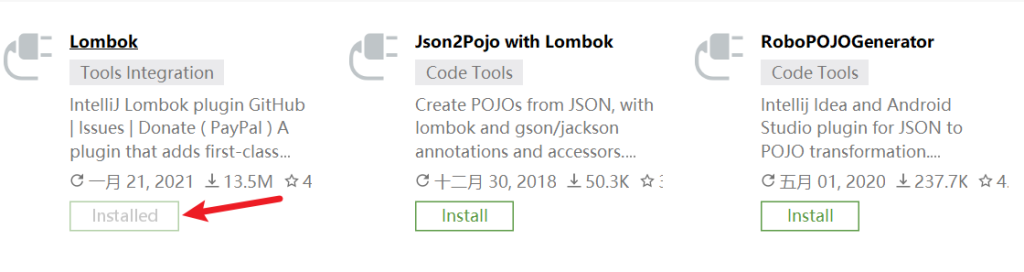
第一步: 安装插件
第二步: 导包
```
<dependency>
       <groupId>org.projectlombok</groupId>
       <artifactId>lombok</artifactId>
       <version>1.18.12</version>
</dependency>
```
第三步: 使用
```
//@Getter@Setter@ToString@EqualsAndHashCode
//@NoArgsConstructor
//@AllArgsConstructor

@Data
public class UserVo {

   private Integer userId;
   private String userName;
   private Integer userAge;
   private String address;

}
```
Lombok: 好处
```
// 1. 优势
在去修改(增删改)成员变量的时候,不用我们自己再去生成getter、setter等,效率比较高

// 2. 缺点
Lombok在项目中,只要有一个人用了,那么其他的组员也都要使用
```
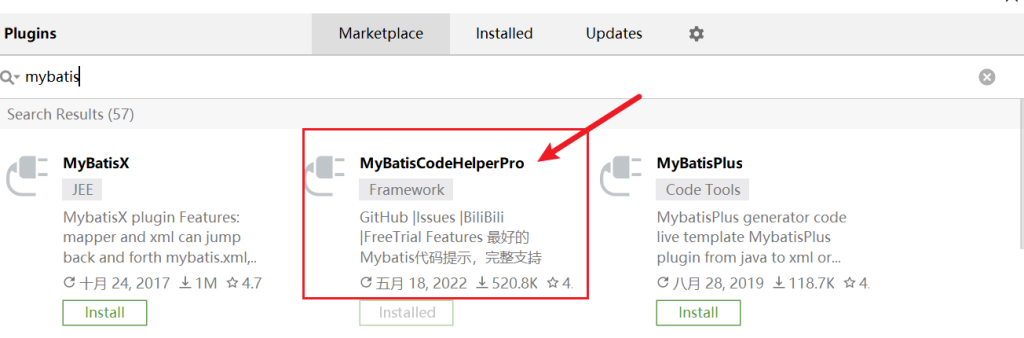
MybatisCodeHelperPro
MybatisCodeHelperPro: 这个是Mybatis的一个插件(提高开发Mybatis应用程序的效率)。
```
// 帮助我们在mapper和mapper.xml 之前来回跳转
// 可以帮助我们生成mapper.xml文件中的标签
// 可以做一定的代码提示
// ...
```
步骤一: 插件安装
多表查询(!!!)
一对一结构
结构示例
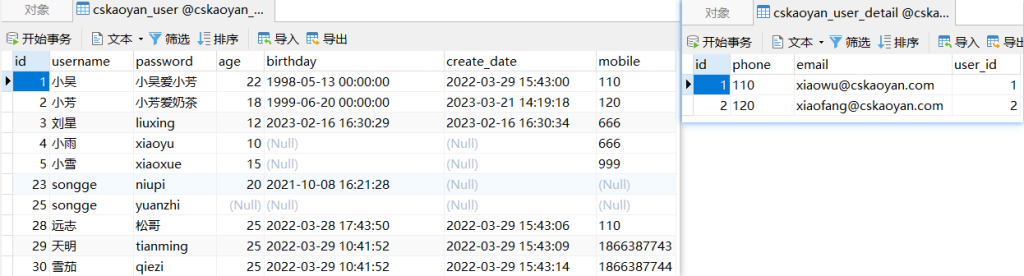
```
CREATE TABLE `cskaoyan_user` (
`id` int(11) NOT NULL AUTO_INCREMENT,
`username` varchar(255) DEFAULT NULL,
`password` varchar(255) DEFAULT NULL,
`age` int(11) DEFAULT NULL,
`birthday` datetime DEFAULT NULL,
`create_date` datetime DEFAULT NULL,
`mobile` varchar(255) DEFAULT NULL,
PRIMARY KEY (`id`)
) ENGINE=InnoDB AUTO_INCREMENT=69 DEFAULT CHARSET=utf8mb4;
CREATE TABLE `cskaoyan_user_detail` (
`id` int(11) NOT NULL AUTO_INCREMENT,
`phone` varchar(255) DEFAULT NULL,
`email` varchar(255) DEFAULT NULL,
`user_id` int(11) DEFAULT NULL,
PRIMARY KEY (`id`)
) ENGINE=InnoDB AUTO_INCREMENT=3 DEFAULT CHARSET=utf8mb4;
```
```
@Data
@AllArgsConstructor
@NoArgsConstructor
public class User {

private Integer id;
 private String username;
 private String password;
 private Integer age;
 private Date birthday;
 private Date createDate;
 private String mobile;
 private UserDetail userDetail;
}
@Data
public class UserDetail {
Integer id;
String phone;
String email;
 String userId;
}
```
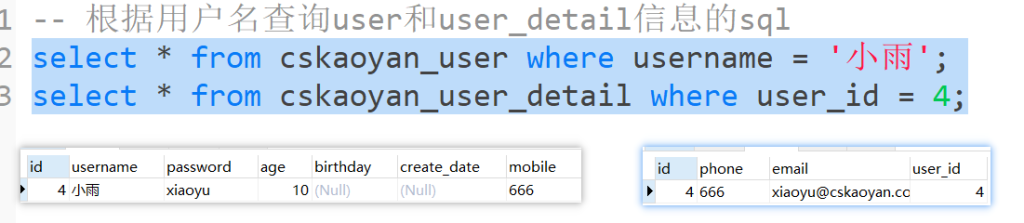
方式一: 分次查询
UserMapper接口
```
//查询到user的信息,并且也能查询到userDetail的信息
User selectUserByUsername(@Param("username") String username);

User[] selectUsersInIdArray(@Param("ids") Integer[] ids);
```
UserMapper.xml文件和UserDetailMapper.xml文件
```
<mapper namespace="com.cskaoyan.demo2.mapper.UserMapper">
<resultMap id="userMap" type="com.cskaoyan.vo.User">
<result column="id" property="id"/>
<result column="username" property="username"/>
<result column="password" property="password"/>
<result column="age" property="age"/>
<result column="birthday" property="birthday"/>
<result column="mobile" property="mobile"/>
<!--column属性:始终对应的是查询结果的列名-->
<!--property属性:始终对应的是父标签类型的成员变量名-->
<result column="create_date" property="createDate"/>
<!--新的标签association → 一对一关系-->
<!--column属性:始终对应的是查询结果的列名,对应的是第一次查询的查询结果的列名,并且也作为第二次查询的参数-->
<!--property属性:始终对应的是父标签类型的成员变量名-->
<!--select属性:执行的第二个sql是谁 → 第二次查询的命名空间+id → 采用的参数是第一次查询结果的column属性列对应的结果-->
<association column="id" property="userDetail"
           select="com.cskaoyan.mapper.UserMapper.selectUserDetailByUserId"/>
</resultMap>

<select id="selectUserByUsername" resultMap="userMap">
SELECT id, username, password, age, mobile, birthday, create_date
from cskaoyan_user
where username = #{username}
</select>

<select id="selectUserDetailByUserId" resultType="com.cskaoyan.vo.UserDetail">
select id, phone, email
from cskaoyan_user_detail
where user_id = #{id}
</select>
</mapper>
```
方式二: 连接查询
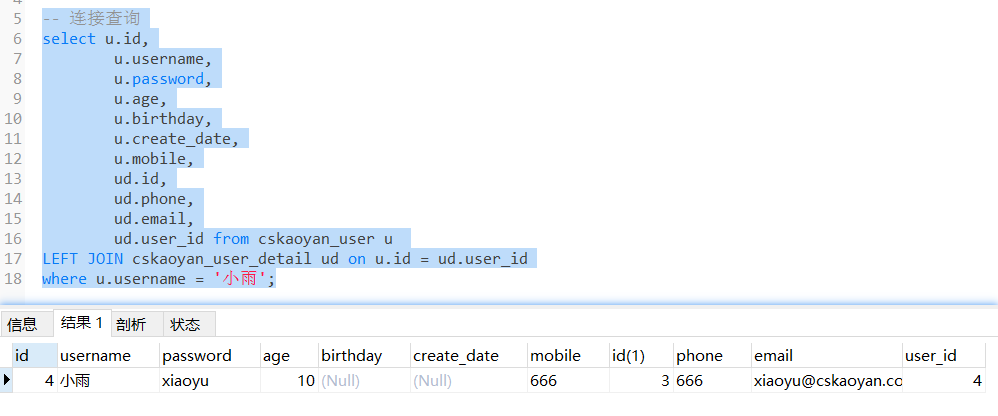
UserMapper接口
```
// 通过左连接查询的方式来查询、封装
User selectUserByUsernameLeftJoin(@Param("username") String username);
```
UserMapper.xml
```
<resultMap id="userMap2" type="com.cskaoyan.demo2.bean.User">
<id column="id" property="id"/>
<result column="username" property="username"/>
<result column="password" property="password"/>
<result column="age" property="age"/>
<result column="birthday" property="birthday"/>
<result column="create_date" property="createDate"/>
<result column="mobile" property="mobile"/>
<!--进一步建立映射关系-->
<association property="userDetail" javaType="com.cskaoyan.demo2.bean.UserDetail">
<id column="udid" property="id"/>
<result column="phone" property="phone"/>
<result column="email" property="email"/>
<result column="user_id" property="userId"/>
</association>
</resultMap>
<select id="selectUserByUsernameLeftJoin" resultMap="userMap2">
select
u.id,
u.username,
u.password,
u.age,
u.birthday,
u.create_date,
u.mobile,
ud.id as udid,
ud.phone,
ud.email,
ud.user_id
from cskaoyan_user u
LEFT JOIN cskaoyan_user_detail ud on u.id = ud.user_id
where u.username = #{username}
</select>
```
一对多结构
结构示例

```
CREATE TABLE `cskaoyan_order` (
`id` int(11) NOT NULL AUTO_INCREMENT,
`name` varchar(255) DEFAULT NULL,
`price` decimal(10,2) DEFAULT NULL,
`user_id` int(11) DEFAULT NULL,
PRIMARY KEY (`id`)
) ENGINE=InnoDB AUTO_INCREMENT=6 DEFAULT CHARSET=utf8mb4;
```
```
@Data
@AllArgsConstructor
@NoArgsConstructor
public class Order {

private Integer id;
private String name;
private Double price;
}
@Data
@AllArgsConstructor
@NoArgsConstructor
public class User {

private Integer id;
private String username;
private String password;
private Integer age;
private Date birthday;
private Date createDate;
private String mobile;
private UserDetail userDetail;
private List<Order> orders;
}
```
方式一: 分次查询
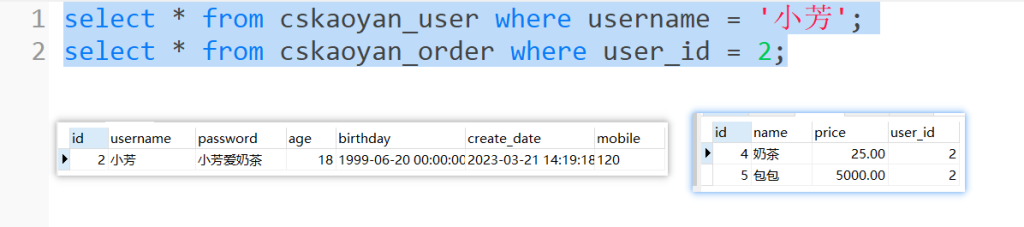
UserMapper接口
```
User selectByPrimaryKey(@Param("id") Integer id);
User selectByUsername(@Param("username") String username);
```
UserMapper.xml
```
<mapper namespace="com.cskaoyan.demo3.mapper.UserMapper">
<sql id="Base_User_Select">
select id, username, password, age, birthday, create_date, mobile  from cskaoyan_user
</sql>
<resultMap id="userMap" type="com.cskaoyan.demo3.bean.User">
<id column="id" property="id"/>
<result column="username" property="username"/>
<result column="password" property="password"/>
<result column="age" property="age"/>
<result column="birthday" property="birthday"/>
<result column="create_date" property="createDate"/>
<result column="mobile" property="mobile"/>
<collection property="orders" column="id" select="com.cskaoyan.demo3.mapper.OrderMapper.selectByUserId"/>
</resultMap>
<select id="selectByPrimaryKey" resultMap="userMap">
<include refid="Base_User_Select"/>
where id = #{id}
</select>

<select id="selectByUsername" resultMap="userMap">
<include refid="Base_User_Select"/>
where username = #{username}
</select>
</mapper>
<mapper namespace="com.cskaoyan.demo3.mapper.OrderMapper">
<resultMap id="orderMap" type="com.cskaoyan.demo3.bean.Order">
<id column="id" property="id"/>
<result column="name" property="name"/>
<result column="price" property="price"/>
</resultMap>
<select id="selectByUserId" resultMap="orderMap">
select id, name, price, user_id from cskaoyan_order where user_id = #{userId}
</select>
</mapper>
```
方式二: 连接查询
UserMapper接口
```
User[] selectUsersByIdArrayLeftJoin(@Param("ids") Integer[] ids);
```
UserMapper.xml
```
<resultMap id="userMapLeftJoin" type="com.cskaoyan.vo.User">
<result column="id" property="id"/>
<result column="username" property="username"/>
<result column="password" property="password"/>
<result column="age" property="age"/>
<result column="birthday" property="birthday"/>
<result column="mobile" property="mobile"/>
<!--column属性:始终对应的是查询结果的列名-->
<!--property属性:始终对应的是父标签类型的成员变量名-->
<result column="create_date" property="createDate"/>
<!--和一对一类型的表达不同-->
<collection property="orders" ofType="com.cskaoyan.vo.Order">
<result column="oid" property="id"/>
<result column="name" property="name"/>
<result column="price" property="price"/>
</collection>
</resultMap>
<select id="selectUsersByIdArrayLeftJoin" resultMap="userMapLeftJoin">
select
u.id,u.username,u.password,u.age,u.mobile,u.birthday,u.create_date,
o.id as oid, o.name, o.price
from cskaoyan_user u
left join cskaoyan_order o on u.id = o.user_id
where u.id in
<foreach collection="ids" item="id" separator="," open="(" close=")">
#{id}
</foreach>
</select>
```
多对多结构
结构示例
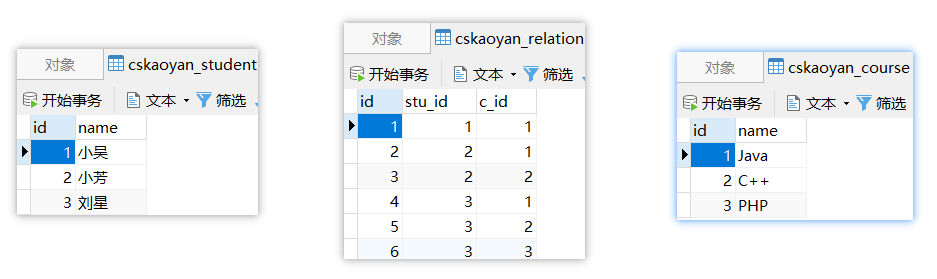
```
CREATE TABLE `cskaoyan_relation` (
`id` int(11) NOT NULL AUTO_INCREMENT,
`stu_id` int(11) DEFAULT NULL,
`c_id` int(11) DEFAULT NULL,
PRIMARY KEY (`id`)
) ENGINE=InnoDB AUTO_INCREMENT=7 DEFAULT CHARSET=utf8mb4;
CREATE TABLE `cskaoyan_student` (
`id` int(11) NOT NULL AUTO_INCREMENT,
`name` varchar(255) DEFAULT NULL,
PRIMARY KEY (`id`)
) ENGINE=InnoDB AUTO_INCREMENT=4 DEFAULT CHARSET=utf8mb4;
CREATE TABLE `cskaoyan_course` (
`id` int(11) NOT NULL AUTO_INCREMENT,
`name` varchar(255) DEFAULT NULL,
PRIMARY KEY (`id`)
) ENGINE=InnoDB AUTO_INCREMENT=4 DEFAULT CHARSET=utf8mb4;
```
```
@Data
public class Student {
Integer id;
String name;
 List<Course> courses;
}
@Data
public class Course {
Integer id;
String name;
List<Student> students;
}
```
方式一: 分次查询
Mapper接口
```
public interface StudentMapper {

 Student selectByName(@Param("name") String name);
}
```
Mapper.xml
```
<mapper namespace="com.cskaoyan.mapper.StudentMapper">
<!--该映射文件里采用的是分次查询-->
<resultMap id="studentMap" type="com.cskaoyan.vo.Student">
 <result column="id" property="id"/>
<result column="name" property="name"/>
 <collection property="courses" column="id" select="com.cskaoyan.mapper.StudentMapper.selectCoursesByStudentId"/>
</resultMap>
<select id="selectByName" resultMap="studentMap">
 select id, name
    from cskaoyan_student
 where name = #{name}
</select>


  <resultMap id="courseMap" type="com.cskaoyan.vo.Course">
 <result column="id" property="id"/>
    <result column="name" property="name"/>
  </resultMap>

  <select id="selectCoursesByStudentId" resultMap="courseMap">
 select c.id, c.name
 from cskaoyan_course c
 left join cskaoyan_relation r on c.id = r.c_id
    where r.stu_id = #{id}
  </select>
</mapper>
```
方式二: 连接查询
Mapper接口
```
public interface CourseMapper {
Course selectByName(@Param("name") String name);
}
```
Mapper.xml
```
<mapper namespace="com.cskaoyan.mapper.CourseMapper">
<resultMap id="courseMap" type="com.cskaoyan.vo.Course">
<result column="id" property="id"/>
<result column="name" property="name"/>
<collection property="students" ofType="com.cskaoyan.vo.Student">
<result column="sid" property="id"/>
<result column="sname" property="name"/>
</collection>
 </resultMap>

 <select id="selectByName" resultMap="courseMap">
   select c.id, c.name, s.id as sid, s.name as sname
   from cskaoyan_course c
   LEFT JOIN cskaoyan_relation r ON c.id = r.c_id
LEFT JOIN cskaoyan_student s ON s.id = r.stu_id
where c.`name` = #{name}
</select>
</mapper>
```
动态SQL(!!!)
动态SQL是Mybatis给我们提供的又一个强大的功能。可以帮助我们根据传入的条件,动态的去改变SQL语句。
通过在映射文件中使用一些不同的标签,会让一个方法对应的SQL语句(主要是insert、delete、update、select标签内的sql语句)产生变化
是为了让你这个标签内的SQL更强大,更通用
数据准备
```
/*
 Navicat Premium Data Transfer

 Source Server         : stone61
 Source Server Type    : MySQL
 Source Server Version : 80300
 Source Host           : localhost:3306
 Source Schema         : clazz61

 Target Server Type    : MySQL
 Target Server Version : 80300
 File Encoding         : 65001

 Date: 08/08/2024 20:32:54
*/

SET NAMES utf8mb4;
SET FOREIGN_KEY_CHECKS = 0;

-- ----------------------------
-- Table structure for cskaoyan_phone
-- ----------------------------
DROP TABLE IF EXISTS `cskaoyan_phone`;
CREATE TABLE `cskaoyan_phone`  (
  `id` int NOT NULL AUTO_INCREMENT,
  `brand` varchar(50) CHARACTER SET utf8mb4 COLLATE utf8mb4_general_ci NOT NULL,
  `name` varchar(50) CHARACTER SET utf8mb4 COLLATE utf8mb4_general_ci NOT NULL,
  `storage` varchar(50) CHARACTER SET utf8mb4 COLLATE utf8mb4_general_ci NOT NULL,
  `memory` varchar(50) CHARACTER SET utf8mb4 COLLATE utf8mb4_general_ci NOT NULL,
  `cpu` varchar(50) CHARACTER SET utf8mb4 COLLATE utf8mb4_general_ci NOT NULL,
  `price` decimal(10, 2) NOT NULL,
  PRIMARY KEY (`id`) USING BTREE
) ENGINE = InnoDB AUTO_INCREMENT = 50 CHARACTER SET = utf8mb4 COLLATE = utf8mb4_general_ci ROW_FORMAT = Dynamic;

-- ----------------------------
-- Records of cskaoyan_phone
-- ----------------------------
INSERT INTO `cskaoyan_phone` VALUES (1, '苹果', 'iPhone 15', '256GB', '8GB', 'A18 Bionic', 9999.99);
INSERT INTO `cskaoyan_phone` VALUES (2, '三星', 'Galaxy S23', '256GB', '12GB', 'Exynos 2300', 8999.99);
INSERT INTO `cskaoyan_phone` VALUES (3, '小米', 'Mi 13', '512GB', '16GB', 'Snapdragon 8 Gen 2', 7999.99);
INSERT INTO `cskaoyan_phone` VALUES (4, '华为', 'P60 Pro', '512GB', '12GB', 'Kirin 1000', 8888.88);
INSERT INTO `cskaoyan_phone` VALUES (5, '一加', '10 Pro', '256GB', '12GB', 'Snapdragon 8 Gen 2', 6999.99);
INSERT INTO `cskaoyan_phone` VALUES (6, 'OPPO', 'Find X6 Pro', '512GB', '16GB', 'Snapdragon 8 Gen 2', 7999.99);
INSERT INTO `cskaoyan_phone` VALUES (7, 'vivo', 'X80 Pro+', '256GB', '12GB', 'Snapdragon 8 Gen 2', 7599.99);
INSERT INTO `cskaoyan_phone` VALUES (8, '苹果', 'iPhone 14', '256GB', '6GB', 'A17 Bionic', 8999.99);
INSERT INTO `cskaoyan_phone` VALUES (9, '三星', 'Galaxy S22', '256GB', '12GB', 'Exynos 2200', 7999.99);
INSERT INTO `cskaoyan_phone` VALUES (10, '小米', 'Mi 12', '512GB', '16GB', 'Snapdragon 8 Gen 1', 7599.99);
INSERT INTO `cskaoyan_phone` VALUES (11, '华为', 'Mate 50 Pro', '512GB', '12GB', 'Kirin 9000s', 8999.99);
INSERT INTO `cskaoyan_phone` VALUES (12, '一加', '9 Pro', '256GB', '12GB', 'Snapdragon 8 Gen 1', 6999.99);
INSERT INTO `cskaoyan_phone` VALUES (13, 'OPPO', 'Reno8 Pro', '512GB', '16GB', 'Snapdragon 8 Gen 1', 7599.99);
INSERT INTO `cskaoyan_phone` VALUES (14, 'vivo', 'X70 Pro+', '256GB', '12GB', 'Snapdragon 8 Gen 1', 7299.99);
INSERT INTO `cskaoyan_phone` VALUES (15, '苹果', 'iPhone 13', '256GB', '4GB', 'A15 Bionic', 7999.99);
INSERT INTO `cskaoyan_phone` VALUES (16, '三星', 'Galaxy S21', '256GB', '8GB', 'Exynos 2100', 6999.99);
INSERT INTO `cskaoyan_phone` VALUES (17, '小米', 'Mi 11', '512GB', '12GB', 'Snapdragon 888', 6999.99);
INSERT INTO `cskaoyan_phone` VALUES (18, '华为', 'P50 Pro', '512GB', '8GB', 'Kirin 9000', 7999.99);
INSERT INTO `cskaoyan_phone` VALUES (19, '一加', '8T Pro', '256GB', '12GB', 'Snapdragon 865+', 5999.99);
INSERT INTO `cskaoyan_phone` VALUES (20, 'OPPO', 'Find X5 Pro', '512GB', '16GB', 'Snapdragon 888', 6999.99);
INSERT INTO `cskaoyan_phone` VALUES (21, 'vivo', 'X60 Pro+', '256GB', '12GB', 'Snapdragon 888', 6999.99);
INSERT INTO `cskaoyan_phone` VALUES (22, '苹果', 'iPhone 12 Pro', '512GB', '6GB', 'A14 Bionic', 8999.99);
INSERT INTO `cskaoyan_phone` VALUES (23, '三星', 'Galaxy S20 Ultra', '512GB', '16GB', 'Exynos 990', 8999.99);
INSERT INTO `cskaoyan_phone` VALUES (24, '小米', 'Mi 10 Ultra', '512GB', '16GB', 'Snapdragon 865', 7999.99);
INSERT INTO `cskaoyan_phone` VALUES (25, '华为', 'Mate 40 Pro', '512GB', '12GB', 'Kirin 9000', 7999.99);
INSERT INTO `cskaoyan_phone` VALUES (26, '一加', '7T Pro', '256GB', '12GB', 'Snapdragon 855+', 5999.99);
INSERT INTO `cskaoyan_phone` VALUES (27, 'OPPO', 'Reno4 Pro', '512GB', '12GB', 'Snapdragon 765G', 4999.99);
INSERT INTO `cskaoyan_phone` VALUES (28, 'vivo', 'X50 Pro+', '256GB', '12GB', 'Snapdragon 865', 5999.99);
INSERT INTO `cskaoyan_phone` VALUES (29, '苹果', 'iPhone 11 Pro', '256GB', '4GB', 'A13 Bionic', 7999.99);
INSERT INTO `cskaoyan_phone` VALUES (30, '三星', 'Galaxy Note 10+', '512GB', '12GB', 'Exynos 9825', 8999.99);
INSERT INTO `cskaoyan_phone` VALUES (31, '小米', 'Mi 9 Pro', '512GB', '12GB', 'Snapdragon 855+', 5999.99);
INSERT INTO `cskaoyan_phone` VALUES (32, '华为', 'P30 Pro', '256GB', '8GB', 'Kirin 980', 6999.99);
INSERT INTO `cskaoyan_phone` VALUES (33, '一加', '6T', '256GB', '8GB', 'Snapdragon 845', 4999.99);
INSERT INTO `cskaoyan_phone` VALUES (34, 'OPPO', 'Reno3 Pro', '256GB', '12GB', 'Snapdragon 765G', 4999.99);
INSERT INTO `cskaoyan_phone` VALUES (35, 'vivo', 'V20 Pro', '256GB', '12GB', 'Snapdragon 720G', 4999.99);
INSERT INTO `cskaoyan_phone` VALUES (36, '苹果', 'iPhone XS Max', '256GB', '4GB', 'A12 Bionic', 8999.99);
INSERT INTO `cskaoyan_phone` VALUES (37, '三星', 'Galaxy Note 9', '512GB', '8GB', 'Exynos 9810', 7999.99);
INSERT INTO `cskaoyan_phone` VALUES (38, '小米', 'Mi 8 Pro', '256GB', '12GB', 'Snapdragon 845', 5999.99);
INSERT INTO `cskaoyan_phone` VALUES (39, '华为', 'Mate 20 Pro', '256GB', '6GB', 'Kirin 980', 6999.99);
INSERT INTO `cskaoyan_phone` VALUES (40, '一加', '6', '256GB', '12GB', 'Snapdragon 845', 4999.99);
INSERT INTO `cskaoyan_phone` VALUES (41, 'OPPO', 'Find X', '256GB', '8GB', 'Snapdragon 845', 5999.99);
INSERT INTO `cskaoyan_phone` VALUES (42, 'vivo', 'NEX S', '256GB', '8GB', 'Snapdragon 845', 5999.99);
INSERT INTO `cskaoyan_phone` VALUES (43, '苹果', 'iPhone X', '256GB', '3GB', 'A11 Bionic', 7999.99);
INSERT INTO `cskaoyan_phone` VALUES (44, '三星', 'Galaxy S10+', '256GB', '8GB', 'Exynos 9820', 6999.99);
INSERT INTO `cskaoyan_phone` VALUES (45, '小米', 'Mi Mix 3', '256GB', '8GB', 'Snapdragon 845', 5999.99);
INSERT INTO `cskaoyan_phone` VALUES (46, '华为', 'Mate 10 Pro', '256GB', '6GB', 'Kirin 970', 6999.99);
INSERT INTO `cskaoyan_phone` VALUES (47, '一加', '5T', '256GB', '8GB', 'Snapdragon 835', 4999.99);
INSERT INTO `cskaoyan_phone` VALUES (48, 'OPPO', 'R15 Pro', '256GB', '8GB', 'Snapdragon 660', 4999.99);
INSERT INTO `cskaoyan_phone` VALUES (49, 'vivo', 'Xplay6', '256GB', '8GB', 'Snapdragon 821', 4999.99);
INSERT INTO `cskaoyan_phone` VALUES (50, '苹果', 'iPhone 8', '64GB', '2GB', 'A11 Bionic', 5999.99);

SET FOREIGN_KEY_CHECKS = 1;
```
业务场景
1. 条件查询 (where、if)
–
`sql
— 查询所有的手机的记录
select * from cskaoyan_phone
— 如果增加机身存储空间的条件
select * from cskaoyan_phone where storage = ‘256GB’
— 继续增加条件CPU为Snapdragon 845
select * from cskaoyan_phone where storage = ‘256GB’ and cpu = ‘Snapdragon 845’
— 继续增加内存
select * from cskaoyan_phone where storage = ‘256GB’ and cpu = ‘Snapdragon 845′ and memory = ’12GB’
```

   - Mapper接口中的方法 可以如何定义

     - List\<Phone> selectAll();
     - List\<Phone> selectByStorage(String storage);
     - List\<Phone> selectByStorageAndCPU(String storage,String cpu);
     - List\<Phone> selectByStorageAndCPUAndMemory(String storage,String cpu,String memory);

     是否有可能我根据存储空间和内存这两个条件查询呢

     是否有可能我根据CPU内存两个条件查询呢?

   - 如果有4个条件选择其中的两个查询,变成C42 = 6种情况

   - 如果使用条件查询 → 只用Mapper接口中的一个方法就能满足我们的需求

     - List\<User> selectByCondition(String storage,String cpu,String memory,String size)

2. 条件更新(插入) (if、trim、set)

   - 更新对象中成员变量不为空的列

3. in语句 (foreach)

   - -- 这样的参数通过输入映射如何传进来
     SELECT * FROM `cskaoyan_user` where id in (1,2,3)

4. 批量插入 (foreach)

   - 传入User的多条记录(User[]、List\<User>、Set\<User>等)
   - 想要通过一条sql语句一起插入到数据库
   - insert into cskaoyan_user (username,password,age,birthday,create_date,mobile) values (?,?,?,?,?,?),(?,?,?,?,?,?),(?,?,?,?,?,?),(?,?,?,?,?,?)


## where(!!!)

where这个标签可以帮助我们在最终执行的SQL中自动生成where关键字
```
//1, 可以自动拼接where关键字 (一般和if配合使用)
//2, 去除相邻的and或者是or关键字
//3, 如果where标签中没有条件满足的时候(如果SQL片段需要拼接),那么where标签不会给我们拼接where关键字
// 注意一般if(工作用到更多一些),choose when otherwise(也会用, 用到相对if少一些),都要注意, 尽量写在where标签内部, 因为, 如果根据条件做处理的时候, 没有任何一个条件满足, 如果又使用的where标签(而不是写死的where关键字), 那么最终执行的sql上不会生成where(避免出错)
```

```
// where标签
// Preparing: select id, brand, name, storage, memory, cpu,price from cskaoyan_phone WHERE id = ?
Phone selectByPrimaryKey(@Param(“id”) Integer id);
```

```
<!–如果where标签后面直接跟了and或or,会在预编译过程被自动省略掉
如果where标签里没有内容,不会拼接where
–>
select id, brand, name, storage, memory, cpu,price from cskaoyan_phone
and id = #{id}
```

## if(!!!)

Java代码中的if 啥功能,如果if中的条件为true,则执行if中的代码

映射文件中使用if标签,test属性它的值为true,则会拼接if标签内的SQL语句;如果test属性值为false则不会拼接

if标签可以帮助我们去做判断是否满足某个条件
```
转义字符(推荐) OGNL表达式(test表达式后面的)
// > > gt
// < < lt
// >= >= gte
// <= <= lte
// !=
// ==
// and
// or
```

```
// 在,引号中,我们可以不使用转义字符,可以使用OGNL表达式的写法
test属性中合法的写法
输入映射可以写的值,那么在test属性中可以直接使用
如果有多个条件 使用 and或or来连接
```

代码示例
```
// if标签 → 完成条件查询
List selectByCondition(@Param(“brand”) String brand, @Param(“name”) String name, @Param(“storage”) String storage, @Param(“memory”) String memory, @Param(“cpu”) String cpu);
```

```
<!–思考:如果brand为空?如果全部参数都为空–>
select id, brand, name, storage, memory, cpu,price
from cskaoyan_phone
brand = #{brand}
and
name= #{name}
and storage = #{storage}
and memory = #{memory}
and cpu = #{cpu}
```


## choose when otherwise

choose when otherwise就相当于Java中的 if .... else....
```
if拼接的sql语句
else拼接的sql语句
```


和where一起使用
```
// choose-when-otherwise标签
// 如果传入的price为6999,则执行的条件为 where price >= #{price}
// 如果传入的price不为6999,则执行的条件为 where price = #{price}
List selectByPrice(@Param(“price”) BigDecimal price);
```

```
select id, brand, name, storage, memory, cpu,price
from cskaoyan_phone
price >= #{price}
price = #{price}
```

```
@Test
public void testChooseWhenOtherwise() {
PhoneMapper phoneMapper = MyBatisUtil.getSqlSession().getMapper(PhoneMapper.class);
//==> Preparing: select id, brand, name, storage, memory, cpu,price from cskaoyan_phone WHERE price >= ?
//==> Parameters: 6999
List phoneList1 = phoneMapper.selectByPrice(BigDecimal.valueOf(6999));
//==> Preparing: select id, brand, name, storage, memory, cpu,price from cskaoyan_phone WHERE price = ?
//==> Parameters: 7000
List phoneList2 = phoneMapper.selectByMemory(BigDecimal.valueOf(7599.99));
}
```

## sql-include(!!!)

映射文件中出现的相同的SQL可以做一个提取

- 把相同的部分放在SQL标签中,并且对外提供一个id,这段SQL也可以称之为SQL片段
- 使用include标签进行引用,refid属性值为sql标签的id属性值

> ```java
> // sql标签可以帮助我们把公共的sql提取出来
> // include可以帮助我们引入公共的sql片段。
> ```
>
> 提取
>
> ```xml
> <sql id="base_sql">
>   select * from `cskaoyan_phone`
> </sql>
> ```
>
> 引入
>
> ```xml
> <select id="selectByPrimaryKey" resultType="com.cskaoyan.bean.Phone">
>   <include refid="base_sql" /> <!-- 引入 -->
>   <where>
>     id=#{id}
>   </where>
> </select>
> ```
>
> ```xml
> <select id="selectByCondition" resultType="com.cskaoyan.bean.Phone">
>   <include refid="base_sql" />  <!-- 引入 -->
>   <where>
>     <if test="brand != null and brand != ''">
>       brand = #{brand}
>     </if>
>     <if test="name != null and name != ''">
>       and `name` = #{name}
>     </if>
>     <if test="storage != null and storage != ''">
>       and storage = #{storage}
>     </if>
>     <if test="memory != null and memory != ''">
>       and memory = #{memory}
>     </if>
>     <if test="cpu != null and cpu != ''">
>       and cpu = #{cpu}
>     </if>
>   </where>
> </select>
> ```
>
> ```java
> // 优点:可以提取公共的sql片段,减少编码量
> // 缺点:用了sql-include 之后,SQL语句的可读性变差了
> ```

<span style='color:red;background:yellow;'>**sql-include 标签我们一般用来提取 列名。**</span>

> 提取
>
> ```xml
> <sql id="base_sql">
>     id, brand, name, storage, memory, cpu,price
> </sql>
> ```
>
> 引入
>
> ```xml
> <select id="selectByPrimaryKey" resultType="com.cskaoyan.bean.Phone">
>     select
>     <include refid="base_sql" />
>     from `cskaoyan_phone`
>     <where>
>         id=#{id}
>     </where>
> </select>
> ```
>
> 好处分析
>
> ```java
> // 避免写select *
> // 避免浪费网络资源
> // 不破坏SQL语句的可读性
> ```


## trim

trim标签里面写的是SQL语句(包含标签),在其内容的最前面和最后面可以增加指定字符,在其内容最前面和最后面也可以去除指定字符

- prefix 前缀
- suffix 后缀
- prefixOverrides
- suffixOverrides


>trim标签可以帮助我们动态的去增加指定的字符,或者是删除指定的字符。
>
>````java
>// 没有增加@Param注解 #{}可以用啥 → 成员变量名
>int updateByPrimaryKey(Phone record);
>int updateByPrimaryKeySelective(Phone record);
>````
>
>```xml
><!--
>prefix: 增加指定的前缀
>suffix: 增加指定的后缀
>prefixOverrides: 删除指定的前缀
>suffixOverrides: 删除指定的后缀
>-->
>```
>
>```xml
><mapper namespace="com.cskaoyan.mapper.PhoneMapper">
>  <update id="updateByPrimaryKey">
>    update cskaoyan_phone
>    set brand = #{brand},
>      `name` = #{name},
>      `storage` = #{storage},
>      memory = #{memory},
>      cpu = #{cpu},
>      price = #{price}
>    where id = #{id}
>  </update>
>  <update id="updateByPrimaryKeySelective">
>    update cskaoyan_phone set
>    <trim suffixOverrides=",">
>      <if test="brand != null">
>        brand = #{brand},
>      </if>
>      <if test="name != null">
>        `name` = #{name},
>      </if>
>      <if test="storage != null">
>        `storage` = #{storage},
>      </if>
>      <if test="memory != null">
>        memory = #{memory},
>      </if>
>      <if test="cpu != null">
>        cpu = #{cpu},
>      </if>
>      <if test="price != null">
>        price = #{price},
>      </if>
>    </trim>
>    where id = #{id}
>  </update>
></mapper>
>```
>
>```xml
>// 也可以将set写到trim标签中
>update cskaoyan_user
>   <trim prefix="set" suffixOverrides=",">
>```


## set(!!!)

> \<set> 就相当于 \<trim prefix="SET" suffixOverrides=",">  这个配置,和这个是等价的。
>
> ````java
> // 去除set标签中的最后一个 ","
> // 拼接set关键字
> ````
>
> ```java
> Phone phone = new Phone();
> phone.setId(1);
> phone.setPrice(BigDecimal.valueOf(10000));
> phoneMapper.updateByPrimaryKeySelective(phone);
> ```
>
> ```java
> int updateByPrimaryKeySelective(Phone record);
> ```
>
> ```xml
> <update id="updateByPrimaryKeySelective">
>   update cskaoyan_phone
>   <set>
>     <if test="brand != null">
>       brand = #{brand},
>     </if>
>     <if test="name != null">
>       `name` = #{name},
>     </if>
>     <if test="storage != null">
>       `storage` = #{storage},
>     </if>
>     <if test="memory != null">
>       memory = #{memory},
>     </if>
>     <if test="cpu != null">
>       cpu = #{cpu},
>     </if>
>     <if test="price != null">
>       price = #{price},
>     </if>
>   </set>
>   where id = #{id}
> </update>
> ```


## foreach(!!!)

做的是遍历,在遍历的过程中,拼接foreach标签中的内容

做的是数组和集合类的遍历

> Foreach可以帮助我们去循环处理SQL语句。

foreach标签以及里面的属性
```
会被遍历拼接的内容
```

- collection属性:
  - 如果Mapper接口中的方法的形参使用了@Param,用的就是@Param注解的属性值
  - 如果没有使用注解:如果是数组,则写array;如果是list就写list
- item属性:自己定义,在foreach标签内可以使用#{}方式使用该值
- open、close属性:最前和最后去拼接字符,拼接**一次**
- separator属性:每两个遍历的内容之间的补充字符;拼接次数为n-1


### 批量插入
```
— 哪些内容出现了n次 → foreach标签中 → (?,?,?,?,?,?)
— 哪些内容出现了n-1次 → separator属性中 → ,
— 哪些内容出现了1次 → open、close属性中 → 无
insert into cskaoyan_user (username,password,age,birthday,create_date,mobile) values (?,?,?,?,?,?),(?,?,?,?,?,?),(?,?,?,?,?,?),(?,?,?,?,?,?)
```


> Foreach在插入的使用
>
> ```java
> // 当个方法中传入的参数没有注解的时候,假如传入的List,那么就可以使用 list,假如传入的是数组,那么就可以使用 array
> // 当方法中传入的参数有注解的时候,collection里面必须写注解的值
> ```
>
> **List类型参数**
>
> 没有注解,  foreach的循环从插入的时候,  要求foreach标签的 collection参数, 是collection  (如果List对象建议写list)
>
> ```java
> /**
>      * 使用foreach做批量插入
>      */
> @Test
> public void testBatchInsert() {
>   User user1 = new User(null,"张三","123456",25,new Date(),new Date(),"110");
>   User user2 = new User(null,"李四","123456",26,new Date(),new Date(),"110");
>   User user3 = new User(null,"王五","123456",27,new Date(),new Date(),"110");
>   List<User> users = Arrays.asList(user1, user2, user3);
>
>   UserMapper userMapper = MyBatisUtil.getMapper(UserMapper.class);
>   int insert = userMapper.insertUsers(users);
>   //==>  Preparing: insert into cskaoyan_user (username,password,age,birthday,create_date,mobile)
>   // values (?,?,?,?,?,?) , (?,?,?,?,?,?) , (?,?,?,?,?,?)
> }
> ```
>
> ```java
> int insertUsers1(List<User> users);
> ```
>
> ```xml
> <!--
>       collection:传入参数的名字,参数没有添加注解的时候,使用 collection | list
>       separator:循环的时候,以什么字符分割开
>       open:在循环开始的时候,添加指定的字符
>       close:在循环结束的时候,添加指定的字符
>       item:循环中的元素名 相当于 for(int i=0;i<100;i++) {}  中的 i
>       index: 元素的下标 -->
>
> <insert id="insertUsers1">
>   insert into cskaoyan_user (username,password,age,birthday,create_date,mobile)
>   values
>   <!--(?,?,?,?,?,?),(?,?,?,?,?,?),(?,?,?,?,?,?),(?,?,?,?,?,?)-->
>   <foreach collection="list" item="user" separator=",">
>     (#{user.username},#{user.password},#{user.age},#{user.birthday},#{user.createDate},#{user.mobile})
>   </foreach>
> </insert>
> ```
>
> **数组类型参数**
>
> ```java
>int insertUsers2(User[] users);
> ```
>
> ```xml
> <insert id="insertUsers2">
>   insert into cskaoyan_user (username,password,age,birthday,create_date,mobile)
>   values
>   <!--(?,?,?,?,?,?),(?,?,?,?,?,?),(?,?,?,?,?,?),(?,?,?,?,?,?)-->
>   <foreach collection="array" item="user" separator=",">
>    (#{user.username},#{user.password},#{user.age},#{user.birthday},#{user.createDate},#{user.mobile})
>   </foreach>
> </insert>
> ```
>
> **添加注解**
>
> 如果在使用foreach的循环从插入的时候,  collection属性值 必须是`注解名`
>
> ```java
> int insertUsers3(@Param("users") List<User> users);
> int insertUsers4(@Param("users") User[] users);
> ```
>
> ```xml
><!--insertUsers4除了id不同,也是一样的写法-->
> <insert id="insertUsers3">
>  insert into cskaoyan_user (username,password,age,birthday,create_date,mobile)
>   values
>   <!--(?,?,?,?,?,?),(?,?,?,?,?,?),(?,?,?,?,?,?),(?,?,?,?,?,?)-->
>   <foreach collection="users" item="user" separator=",">
>     (#{user.username},#{user.password},#{user.age},#{user.birthday},#{user.createDate},#{user.mobile})
>   </foreach>
> </insert>
> ```

### 使用in查询

>Foreach在查询时候的使用:
>
>注意: foreach collection在不使用注解情况下, 默认集合类使用collection (List建议使用List),  数组使用array
>
>如果参数使用了注解, foreach 标签的collection属性使用注解名
>
>```java
>@Test
>public void testForeachIn() {
>  UserMapper userMapper = MyBatisUtil.getMapper(UserMapper.class);
>  List<Integer> ids = Arrays.asList(1, 2, 3);
>  List<User> users = userMapper.selectByIds3(ids);
>  System.out.println("users = " + users);
>  //==>  Preparing: select id, username, password, age, birthday, create_date, mobile from cskaoyan_user WHERE id in ( ? , ? , ? )
>  //==> Parameters: 1(Integer), 2(Integer), 3(Integer)
>}
>```
>
>```java
>// 以下几种写法,collection属性值应该如何写
>// 无注解数组 → collection="array"
>List<User> selectByIds1(Integer[] ids);
>// 有注解数组 → collection="ids"
>List<User> selectByIds2(@Param("ids") Integer[] ids);
>// 无注解List → collection="list"
>List<User> selectByIds3(List<Integer> ids);
>// 有注解List → collection="ids"
>List<User> selectByIds4(@Param("ids") List<Integer> ids);
>```
>
>```xml
><sql id="BASE_USER_Select">
>      select id, username, password, age, birthday, create_date, mobile from cskaoyan_user
></sql>
><select id="selectByIds1" resultType="com.cskaoyan.demo1.bean.User">
>      <include refid="BASE_USER_Select"/>
>      <where>
>         <!--
>                ?出现n次 → foreach标签中的内容
>                ,出现n-1次 → separator中的内容
>                ()都出现一次 → open,close
>            -->
>         id in
>         <foreach collection="array" item="id" separator="," open="(" close=")">
>           #{id}
>         </foreach>
>      </where>
></select>
><select id="selectByIds2" resultType="com.cskaoyan.demo1.bean.User">
>      <include refid="BASE_USER_Select"/>
>      <where>
>         <!--
>                ?出现n次 → foreach标签中的内容
>                ,出现n-1次 → separator中的内容
>                ()都出现一次 → open,close
>            -->
>         id in
>         <foreach collection="ids" item="id" separator="," open="(" close=")">
>           #{id}
>         </foreach>
>      </where>
></select>
><select id="selectByIds3" resultType="com.cskaoyan.demo1.bean.User">
>      <include refid="BASE_USER_Select"/>
>      <where>
>         <!--
>                ?出现n次 → foreach标签中的内容
>                ,出现n-1次 → separator中的内容
>                ()都出现一次 → open,close
>            -->
>         id in
>         <foreach collection="list" item="id" separator="," open="(" close=")">
>           #{id}
>         </foreach>
>      </where>
></select>
><select id="selectByIds4" resultType="com.cskaoyan.demo1.bean.User">
>      <include refid="BASE_USER_Select"/>
>      <where>
>         <!--
>                ?出现n次 → foreach标签中的内容
>                ,出现n-1次 → separator中的内容
>                ()都出现一次 → open,close
>            -->
>         id in
>         <foreach collection="ids" item="id" separator="," open="(" close=")">
>           #{id}
>         </foreach>
>      </where>
></select>
>```


## selectkey

额外执行一个查询,并且将查询的结果给到输入映射传入的参数

> 这个标签可以帮助我们在执行目标SQL语句之前或者是之后执行一条额外的SQL语句。
>
> **AFTER操作**
>
> ```java
> @Test
> public void testInsert() {
>   UserMapper userMapper = MyBatisUtil.getMapper(UserMapper.class);
>   User user = new User(null,"赵六","123456",25,new Date(),new Date(),"110");
>   int insert = userMapper.insertUser(user);
>   System.out.println("id = " + user.getId());
>   //==>  Preparing: insert into cskaoyan_user (username,password,age,birthday,create_date,mobile) values (?,?,?,?,?,?)
>   //==> Parameters: 赵六(String), 123456(String), 25(Integer), 2023-03-28 14:34:30.268(Timestamp), 2023-03-28 14:34:30.268(Timestamp), 110(String)
>   //<==    Updates: 1
>   //==>  Preparing: select LAST_INSERT_ID() as lastid
>   //==> Parameters:
>   //<==    Columns: lastid
>   //<==        Row: 73
>   //<==      Total: 1
>   //id = 73
> }
> ```
>
> ```java
> int insertUser(@Param("user") User user);
> ```
>
> ```xml
> <!--keyColumn:查询结果集中的列名
>         keyProperty:封装给谁 → 和输入映射可写的值有关系 → user  user.xxx
>         resultType:查询结果的类型
>         标签中:额外执行的sql语句
>         order:顺序,相较于当前的sql语句,额外的查询的相对顺序
>     -->
> <insert id="insertUser">
>     <selectKey keyColumn="lastid" keyProperty="user.id" resultType="integer" order="AFTER">
>        select LAST_INSERT_ID() as lastid
>     </selectKey>
>     insert into cskaoyan_user (username,password,age,birthday,create_date,mobile)
>     values
>     (#{user.username},#{user.password},#{user.age},#{user.birthday},#{user.createDate},#{user.mobile})
>
>     <!--执行完insert之后,执行select LAST_INSERT_ID(); 这个查询是有结果的,这个结果要给到userid-->
> </insert>
> ```
>
> **BEFORE:操作**
>
> 一般不需要使用BEFORE操作,实际开发过程中AFTER操作使用的也是比较少的,我们可以使用下面的方式来获得自增的主键


## useGeneratedKeys(!!!)

需要使用到两个属性:useGeneratedKeys、keyProperty

>useGeneratedKeys:  获取insert/update操作数据的主键
>
>```java
>开启配置:useGeneratedKeys="true"
>映射到对应的参数中:keyProperty="order.id"
>```
>
>```java
>@Test
>public void testInsert2() {
>    UserMapper userMapper = MyBatisUtil.getMapper(UserMapper.class);
>    User user = new User(null,"孙七","123456",25,new Date(),new Date(),"110");
>    int insert = userMapper.insertUser2(user);
>    System.out.println("id = " + user.getId());
>}
>```
>
>```java
>int insertUser2(@Param("user") User user);
>```
>
>    ```xml
>     <insert id="insertUser2" useGeneratedKeys="true" keyProperty="user.id">
>       insert into cskaoyan_user (username,password,age,birthday,create_date,mobile)
>       values
>       (#{user.username},#{user.password},#{user.age},#{user.birthday},#{user.createDate},#{user.mobile})
>     </insert>
>     ```

# 懒加载(了解)

> 懒加载和MyBatis缓存作为了解, 知道是怎么回事, 面试的时候可以谈一谈思想即可, 因为工作中并不会使用(基本不会使用)
>
> 懒加载又叫做延迟加载。
>
> ```java
> // 是指在Mybatis进行分次查询的时候,假如第二次查询的内容没有被使用到的话,那么就不去执行第二次查询的SQL语句,等到用到第二次查询的内容的时候再去执行第二条SQL语句。
> ```
>
> 注意:
>
> ```java
> // 1. 当局部开关配置的时候,以局部开关的配置为准
> // 2. 当局部开关没有配置的时候,以总开关的配置为准
> // 3. 当总开关也没有配置的时候,以默认配置为准(默认配置是关闭懒加载)
> ```

>总开关配置: mybatis的主配置文件里面的settings里面
>
>```xml
><settings>
>     <!-- 懒加载 true: 表示开启  false:默认值,表示关闭 -->
>     <setting name="lazyLoadingEnabled" value="true"/>
></settings>
>```
>
>案例
>
>```java
>public interface UserMapper {
>
>      User[] selectUsersByIdArray(@Param("ids") Integer[] ids);
>
>}
>```
>
>

>局部开关
>
>```xml
><mapper namespace="com.cskaoyan.mapper.UserMapper">
>    <resultMap id="userMap" type="com.cskaoyan.vo.User">
>        <result column="id" property="id"/>
>        <result column="username" property="username"/>
>        <result column="password" property="password"/>
>        <result column="age" property="age"/>
>        <result column="birthday" property="birthday"/>
>        <result column="mobile" property="mobile"/>
>        <!--column属性:始终对应的是查询结果的列名-->
>        <!--property属性:始终对应的是父标签类型的成员变量名-->
>        <result column="create_date" property="createDate"/>
>        <!--一对多使用的标签是collection标签-->
>        <collection column="id" property="orders" fetchType="eager"
>                     select="com.cskaoyan.mapper.UserMapper.selectOrdersByUserId"/>
>    </resultMap>
>    <!--第一次查询-->
>    <select id="selectUsersByIdArray" resultMap="userMap">
>        SELECT id,username,password,age,mobile,birthday,create_date from cskaoyan_user
>        where id in
>        <foreach collection="ids" item="id" separator="," open="(" close=")">
>           #{id}
>        </foreach>
>    </select>
>    <!--select标签在Mapper接口中是否有对应的方法?没有,如果作为分次查询的第二次查询#{}里可以任意写-->
>    <select id="selectOrdersByUserId" resultType="com.cskaoyan.vo.Order">
>        select id, name, price
>        from cskaoyan_order
>        where user_id = #{zzz}
>    </select>
>
></mapper>
>
>```
>
>注意:idea的Debug模式下不能复现懒加载,因为debug模式会显示出对象中的所有的信息,相当于已经用到了第二次SQL语句查询的内容,所以第二次SQL语句就会立马执行

# 缓存(了解)

> 缓存是指在Mybatis中,单独开辟一块内存空间(map),来存储查询的信息。后续假如再次调用了到了同样的查询,那么就直接查询缓存。
>
> `MyBatis默认开启了缓存`
>
> ```java
> MyBatis是怎么存储缓存的: 在MyBatis中缓存是以Map(集合类容器)接口存储的
> // map:
> //  	key:SQL语句和查询的条件(注意: SQL语句是依赖于坐标的)
> //							 (MapperID+Sql+所有的入参)
> // 		value:查询的结果
> ```

## 一级缓存

> <span style='color:red;background:yellow;'>**一级缓存是一个以SqlSession管理的Mapper级别的缓存**</span>。缓存的内容存储在SQLSession中管理。
>
> <img src="./image/05_MyBatis/image-20220523111926242.png" alt="image-20220523111926242" width="67%;" />

> 配置:一级缓存默认是开启的,并且没有提供开关给用户关闭(不可以关闭)。
>
> ```java
> 一级缓存什么时候失效呢?
> //  	SqlSession关闭的时候
> //    SqlSession调用增删改的时候,会清空当前SqlSession缓存
> // 		SqlSession调用commit方法
> ```

### 测试

> 同一个SqlSession 获取的同一个Mapper: 走缓存
>
> 同一个SQLSession获取不同的mapper: 走缓存
>
> 不同SQLSession获取不同的mapper: 不走缓存
>
> ```java
> @Test
> public void mytest1() {
>     //使用同一个sqlSession的同一个Mapper可以使用到一级缓存
>     User user1 = userMapper.selectByPrimaryKey(1);//生成缓存
>     User user2 = userMapper.selectByPrimaryKey(1);//使用缓存
>     User user3 = userMapper.selectByPrimaryKey(1);//使用缓存
>     User user4 = userMapper.selectByPrimaryKey(1);//使用缓存
>     User user5 = userMapper.selectByPrimaryKey(1);//使用缓存
>
> }
>
> @Test
> public void mytest2() {
>     //使用同一个sqlSession的不同Mapper可以使用到一级缓存
>     UserMapper userMapper1 = sqlSession.getMapper(UserMapper.class);
>     UserMapper userMapper2 = sqlSession.getMapper(UserMapper.class);
>
>     User user1 = userMapper1.selectByPrimaryKey(1);//生成缓存
>     User user2 = userMapper1.selectByPrimaryKey(1);//使用缓存
>     User user3 = userMapper2.selectByPrimaryKey(1);//使用缓存
>     User user4 = userMapper2.selectByPrimaryKey(1);//使用缓存
>
> }
>
> @Test
> public void mytest3() {
>     //如果sqlSession发生变化,使用不到一级缓存
>     SqlSession sqlSession1 = sqlSessionFactory.openSession();
>     SqlSession sqlSession2 = sqlSessionFactory.openSession();
>
>     UserMapper userMapper1 = sqlSession1.getMapper(UserMapper.class);
>     UserMapper userMapper2 = sqlSession2.getMapper(UserMapper.class);
>     User user1 = userMapper1.selectByPrimaryKey(1);//生成缓存
>     User user2 = userMapper1.selectByPrimaryKey(1);//使用缓存
>     User user3 = userMapper2.selectByPrimaryKey(1);//生成缓存
>     User user4 = userMapper2.selectByPrimaryKey(1);//使用缓存
> }
>
>
> @Test
> public void mytest4() {
>     //使用同一个sqlSession的同一个Mapper可以使用到一级缓存
>     User user1 = userMapper.selectByPrimaryKey(1);//生成缓存
>     User user2 = userMapper.selectByPrimaryKey(1);//使用缓存
>     User user3 = userMapper.selectByPrimaryKey(1);//使用缓存
>     sqlSession.commit();                             //缓存失效
>     User user4 = userMapper.selectByPrimaryKey(1);//生成缓存
>     User user5 = userMapper.selectByPrimaryKey(1);//使用缓存
>
> }
> ```


## 二级缓存

> <span style='color:red;background:yellow;'>**二级缓存是一个NameSpace级别(mapper.xml)的缓存**</span>,每一个NameSpace都有自己的单独的缓存空间。(要通过两级配置开启)

> 配置1:总开关
>
> ```xml
> <!-- 二级缓存开关配置 -->
> <setting name="cacheEnabled" value="true"/>
> ```
>
> 配置2: 局部开关
>
```
```


><span style="color:red">需要对二级缓存的缓存的所有相关对象实现序列化接口</span>
>
>开启自动生成序列化id
>
><img src="./image/05_MyBatis/image-20220523114729631.png" alt="image-20220523114729631" width="67%;" />
>
>实现序列化接口,生成序列化id
>
><img src="./image/05_MyBatis/image-20220523114755302.png" alt="image-20220523114755302" width="67%;" />

>```java
>// 1, 二级缓存是 namespace级别/Mapper级别 的缓存
>// 2, 多个SqlSession可以共用二级缓存(同一个Mapper)
>// 3, 在关闭sqlsession后(close);  才会把该sqlsession一级缓存中的数据添加到对应namespace的二级缓存中。
>// 4, 当Mybatis默认先查询二级缓存,二级缓存中无对应数据,再去查询一级缓存,一级缓存中也没有,最后去数据库查找。
>```
>
><img src="./image/05_MyBatis/image-20220523142818860.png" alt="image-20220523142818860" width="67%;" />

### 测试

>测试
>
>```java
>@Test
>public void mytest3() {
>    SqlSession sqlSession1 = sqlSessionFactory.openSession();
>    SqlSession sqlSession2 = sqlSessionFactory.openSession();
>    SqlSession sqlSession3 = sqlSessionFactory.openSession();
>    SqlSession sqlSession4 = sqlSessionFactory.openSession();
>
>    UserMapper userMapper1 = sqlSession1.getMapper(UserMapper.class);
>    UserMapper userMapper2 = sqlSession2.getMapper(UserMapper.class);
>    UserMapper userMapper3 = sqlSession3.getMapper(UserMapper.class);
>    UserMapper userMapper4 = sqlSession4.getMapper(UserMapper.class);
>
>    User user1 = userMapper1.selectByPrimaryKey(1);
>    User user2 = userMapper2.selectByPrimaryKey(1);
>    User user3 = userMapper3.selectByPrimaryKey(1);
>    User user4 = userMapper4.selectByPrimaryKey(1);
>    //这个案例没有使用到二级缓存
>}
>@Test
>public void mytest4() {
>    SqlSession sqlSession1 = sqlSessionFactory.openSession();
>    SqlSession sqlSession2 = sqlSessionFactory.openSession();
>    SqlSession sqlSession3 = sqlSessionFactory.openSession();
>    SqlSession sqlSession4 = sqlSessionFactory.openSession();
>
>    UserMapper userMapper1 = sqlSession1.getMapper(UserMapper.class);
>    UserMapper userMapper2 = sqlSession2.getMapper(UserMapper.class);
>    UserMapper userMapper3 = sqlSession3.getMapper(UserMapper.class);
>    UserMapper userMapper4 = sqlSession4.getMapper(UserMapper.class);
>
>    User user1 = userMapper1.selectByPrimaryKey(1);
>    sqlSession1.close(); //将数据放入二级缓存
>    User user2 = userMapper2.selectByPrimaryKey(1);
>    User user3 = userMapper3.selectByPrimaryKey(1);
>    User user4 = userMapper4.selectByPrimaryKey(1);
>    User user5 = userMapper4.selectByPrimaryKey(1);
>    //这个案例有使用到二级缓存 cache hit ratio
>}
>```

> 二级缓存有没有用呢?
>
> - 其实有一定的作用,但是也有一定的缺陷
>
>   - 确实能够提高Mybatis的性能
>   - 不能完美的解决脏数据的问题
>   - 二级缓存空间对于用户来说是完全透明的,我们用户不能够直接的去操作它,也不能够让用户指定去查询数据库还是查询缓存,所以其实使用起来不太方便
>
>   在以后的工作中,有一些需要使用缓存的场景,那么这个时候我们不会考虑使用Mybatis给我们提供的缓存,取而代之的是使用我们的NoSQL数据库(Redis)。

# 注解(了解)

在MyBatis的Mapper接口中也可以使用注解的方式来进行开发

> 使用以下几个注解
>
> @Select
>
> @Insert
>
> @Delete
>
> @Update
>
> 这些注解均可以直接写在Mapper接口中的方法上,在注解的value属性中直接写SQL语句,这样子就不需要在映射文件中写了

比如我们这样子来写
```
public interface UserMapper{
@Select(“select * from cskaoyan_user where id = #{id}”)
User selectByPrimaryKey(@Param(“id”)Integer id);
@Delete(“delete from cskaoyan_user where id = #{id}”)
int deleteByPrimaryKey(@Param(“id”)Integer id)
}